
.png?fit=max&auto=format&n=fTXEPIUfjW4rC1Pi&q=85&s=85d7b852879d29ad2bde9b743307ab0e)
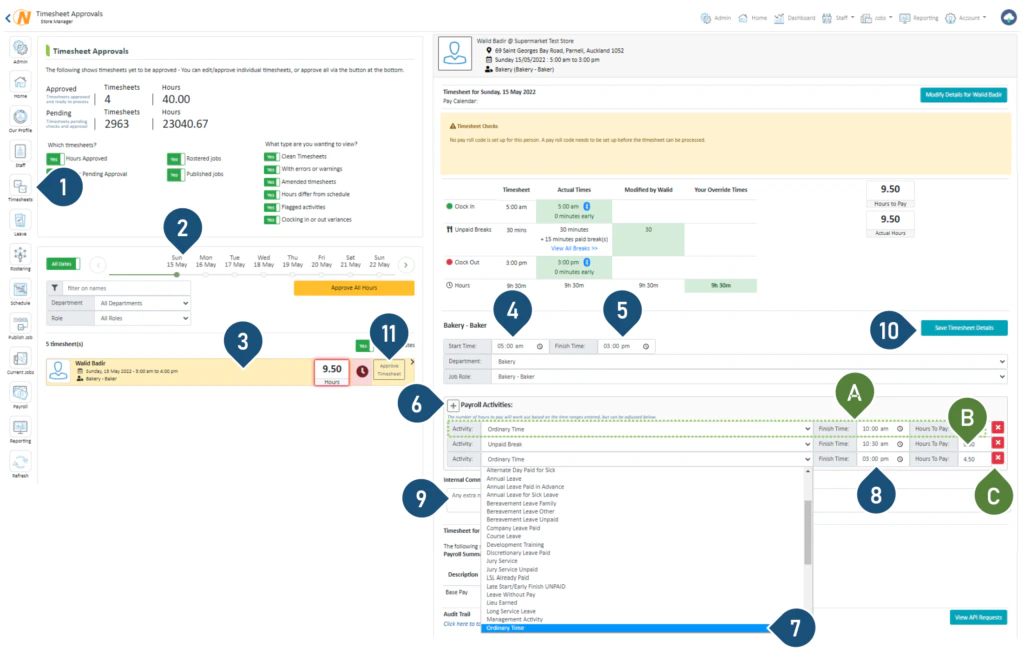
- Select the Timesheets button.
- Select the date.
- Select the timesheet you wish to view.
- Enter the new start time the employee worked, e.g. the employee arrived late, or the employee was asked to start earlier etc.
- Enter the new finish time the employee worked, e.g. the employee left early, or the employee was asked to work longer etc.
- Click here to add a new payroll activity line.
- Choose the type of activity from the dropdown menu.
- Edit the end times of the payroll activity.
- Enter a comment if you wish to leave extra notes.
- Select Save Timesheet Details.
- If you are ready to approve the timesheet, click Approve timesheet.