Simplifi Documentation Hub home page
Search...
⌘K
Ask AI
Search...
Navigation
Time, Attendance & Approvals
How to Send a Shift Reminder to a Staff Member
Simplifi Internal Documentation
Simplifi Documentation
On Task Documentation
API Documentation
Simplifi Documentation V1
Simplifi
About Simplifi
Admin/Our Profile Settings
Our Locations
Our Users/Our Additional Users
Our Roles
Our Shifts, Breaks and Working Hours
Clocking In & Out
Timesheet Activities
Leave Requests
Public Holidays & Closedown Periods
File Import Templates
Integrations
Payroll Settings/Payroll Engine
Rostering Settings
Google/Apple Calendars
Job/Timesheet/Staff Information Collected
Third Party Details/Information
Employee Help
Installing The Simplifi App
Setting a Secure Password
Managing Your Calendar
Apply for Additional Jobs/Shifts
Managing Leave
Clocking In and Out Using Your Phone
Forgot Your Password?
Access Your Simplifi Account via Web Browser
Request a Timesheet Modification
Request to Swap Shifts
How to Update your Compliance
Staff Profiles
Staff Profiles Overview
How to Terminate a Staff Member/Casual
How to Assign the Company Manager
How to Reactivate a User
How to Make a User Inactive
How to Promote an Employee to a User
How to Reset an Employee's Password
How to Add a Manually Maintained Employee
How to Set Up a New Employee from a Sync
How to Find an Employee's Profile
Staff Compliance
What is a Group?
Staff Rostering
Staff Rostering Overview
How to Mark an Absence on the Roster
How to Change the Shift Times on a Roster
How to Add a Staff Member to the Roster
How to Edit or Cancel a Job
Relievers Help
Jobs Help
How to View the Daily Schedule
How to Add a Staff Member to a Roster
Time, Attendance & Approvals
Time, Attendance & Approvals Overview
Staff Hours Help
Timesheets Help
How to Clock In/Out on Behalf of a Staff Member
How to Send a Shift Reminder to a Staff Member
How to Process a Shift Swap Request
How to Edit or Cancel a Published Shift
How to Assign a Staff Member/Casual to a Published Shift
How to Add Lieu Earned, Overtime or Another Activity on the Roster
How to Change the Times of a Shift
How to Delete a Shift from the Roster
Managing Schedules with the Multi-Period Shift Option
Using the Simplifi KIOSK on Apple Devices
Reporting
Reporting Overview
How to Create New Reporting Roles
Casual Staff Management
Casual Staff Management Overview
How to Assign a Casual with Alternative Responses
How to Unassign a Casual from a Job
Leave Management
Leave Management Overview
How to Change Decisions for a Leave Request
How to Process a Leave Request
How to Record Leave for a Staff Member
How to Endorse a Leave Request
Payroll Integration
Payroll Integration Overview
Payroll Processing Method
Payroll Processing Method – CSV File
Release Notes
January 2026
Time, Attendance & Approvals
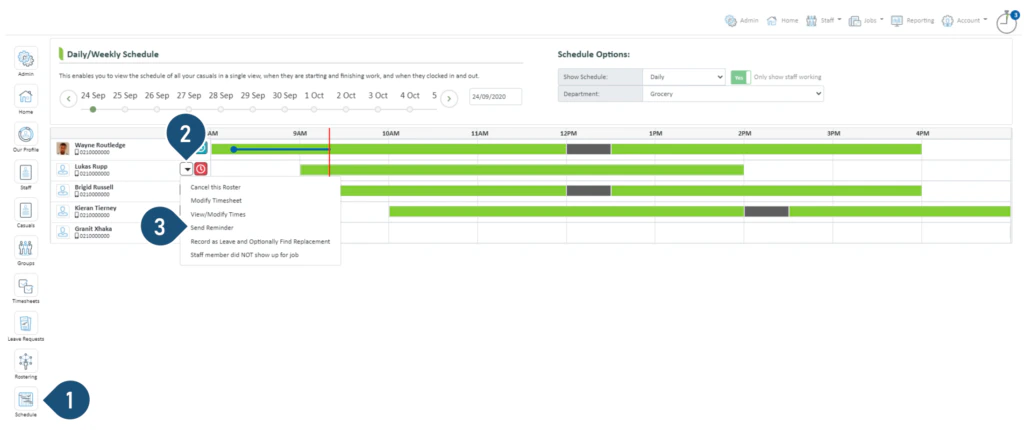
How to Send a Shift Reminder to a Staff Member
Select the
Schedule
button.
Click to open a drop-down menu.
Select
Send Reminder
.
Was this page helpful?
Yes
No
How to Clock In/Out on Behalf of a Staff Member
How to Process a Shift Swap Request
⌘I
Assistant
Responses are generated using AI and may contain mistakes.
Suggestions
How can I Publish a job?
How can I Change Contracted Hours?
I have Forgotten my Password. What can I do?
Contact support