
.png?fit=max&auto=format&n=fTXEPIUfjW4rC1Pi&q=85&s=85d7b852879d29ad2bde9b743307ab0e)
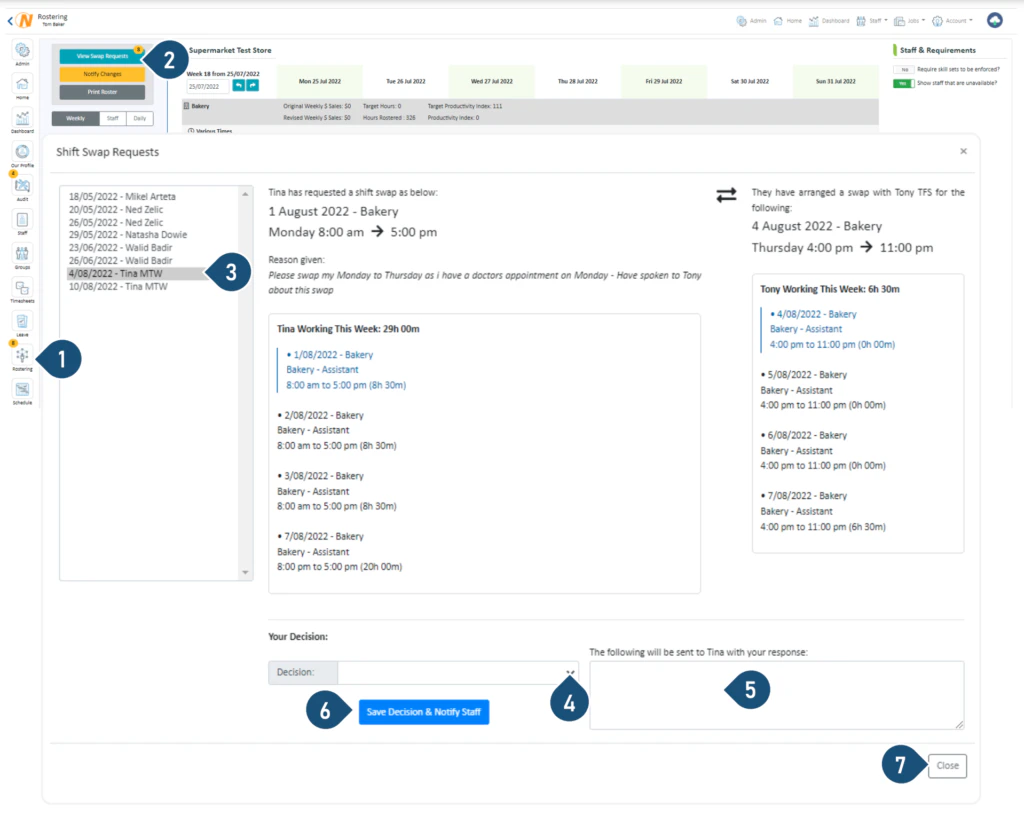
- Select the Rostering button – if this button has a number on the top left corner, it indicates there are swap requests waiting for you to action.
- Select View Swap Requests.
- Select the Request you wish to view.
- Click one of the decisions:
- Approve Request – Remove the timesheet and you will find a replacement.
- Approve Request – Swap timesheets with an alternative provided by the Requester or Give Extra Shift.
- Decline Request – They are still required to work.
- Enter any comments you wish to send the Requester.
- Select Save Decision & Notify Staff.
- Select Close.