
.png?fit=max&auto=format&n=fTXEPIUfjW4rC1Pi&q=85&s=85d7b852879d29ad2bde9b743307ab0e)
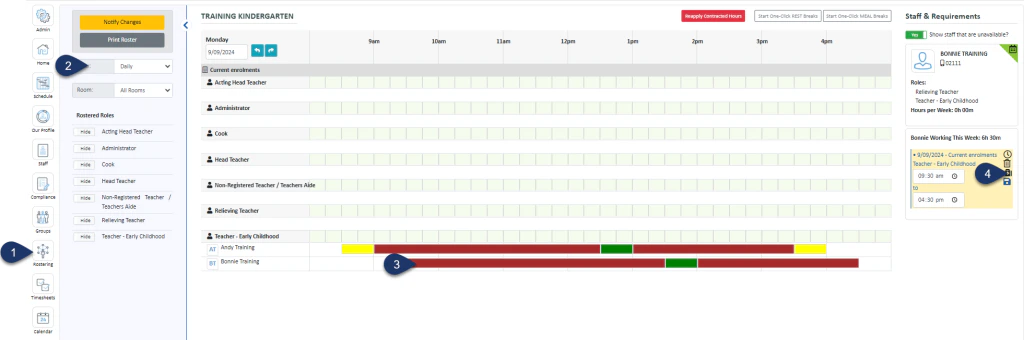
- Open the Rostering Module
- Select the Daily View (this can be done from the weekly view too)
- Select the Shift Bar
- Select the First Aid Kit icon to mark an absence
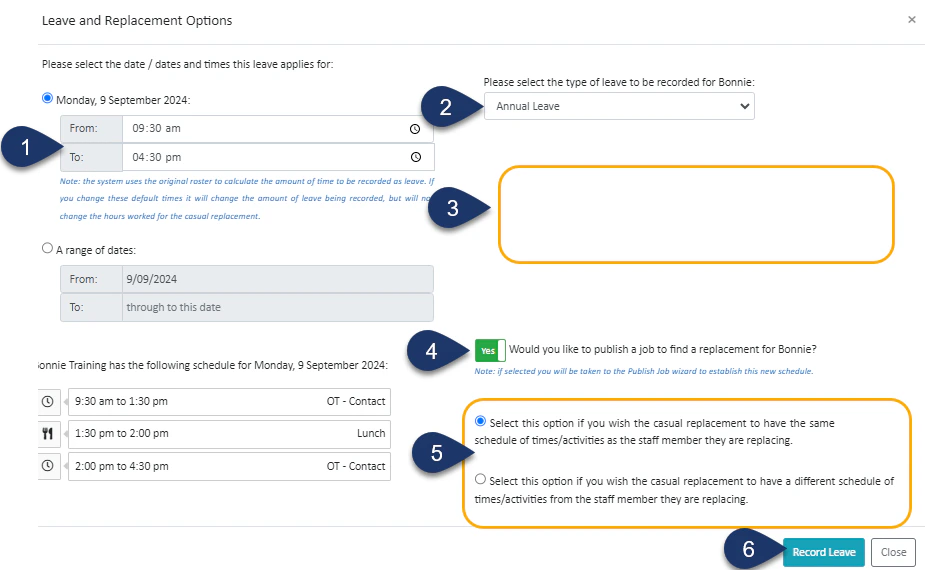
- Choose the time of absence – or leave as it is if the person is away for the whole shift
- Select the type of leave
- The Employee’s leave balance will be displayed here
- Switch the toggle to No if you do not wish to find a replacement for this person. If left as Yes, when you select Record Leave you will be taken to the Job Publishing screen to publish the shift out to your casuals
- If the toggle is Yes, here you can choose if the casual replacing this person does the exact shift as the absentee or something different
- Select Record Leave