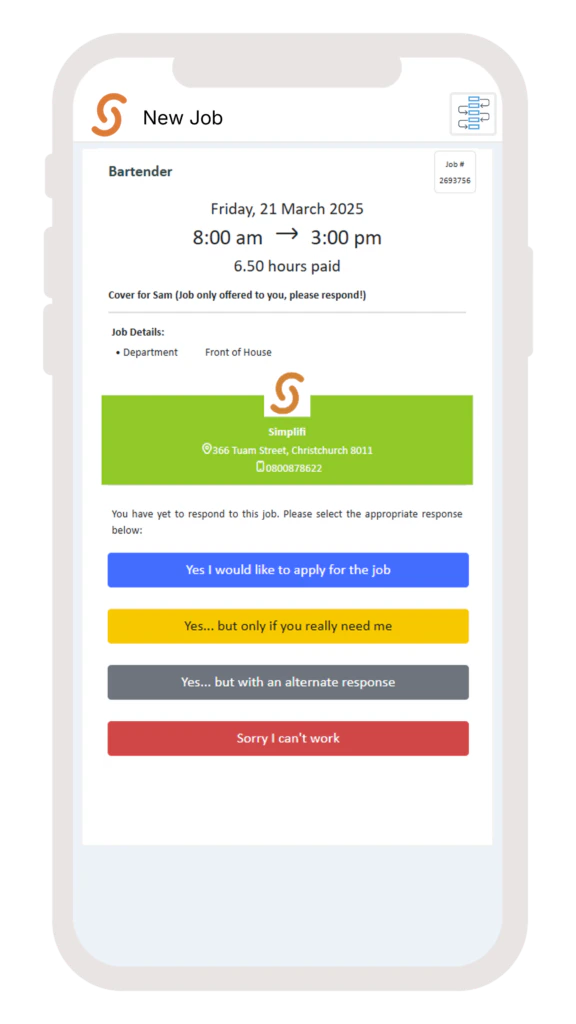
You’ll receive a notification when your organisation posts a new job or shift. It will appear on your home screen under New Jobs, or you can find it by clicking Menu, then Jobs, and selecting New Jobs.
Click on the job to view the details and choose one of the options.
Note: Depending on your organisation’s settings, you may only see 3 options.If you select ‘Yes… But with an alternative response’, type your alternative response and select Send.You’ll be notified if your request is successful.
Was this page helpful?
Assistant
Responses are generated using AI and may contain mistakes.

.png?fit=max&auto=format&n=fTXEPIUfjW4rC1Pi&q=85&s=85d7b852879d29ad2bde9b743307ab0e)