
.png?fit=max&auto=format&n=fTXEPIUfjW4rC1Pi&q=85&s=85d7b852879d29ad2bde9b743307ab0e)
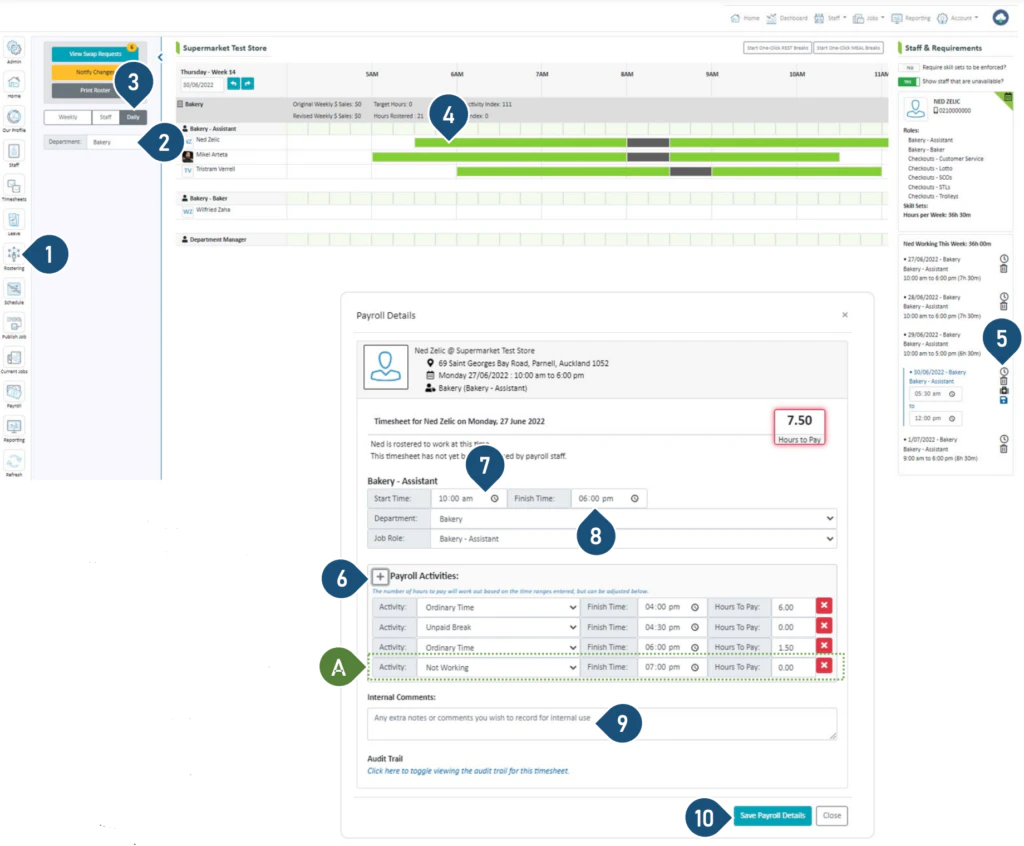
- Select the Rostering button.
- Select the Department.
- Select the Daily view.
- Click on the shift.
- Click on the clock to edit the details of the shift.
- Click the + to add another payroll activity.
- Choose an activity from the drop-down menu e.g. Lieu Earned, Overtime etc.
- Adjust the end times accordingly.
- Leave any comments for internal records.
- Click Save Payroll Details.
Note: The different colours of the shift bar represent different timesheet activities