.png?fit=max&auto=format&n=fTXEPIUfjW4rC1Pi&q=85&s=85d7b852879d29ad2bde9b743307ab0e)

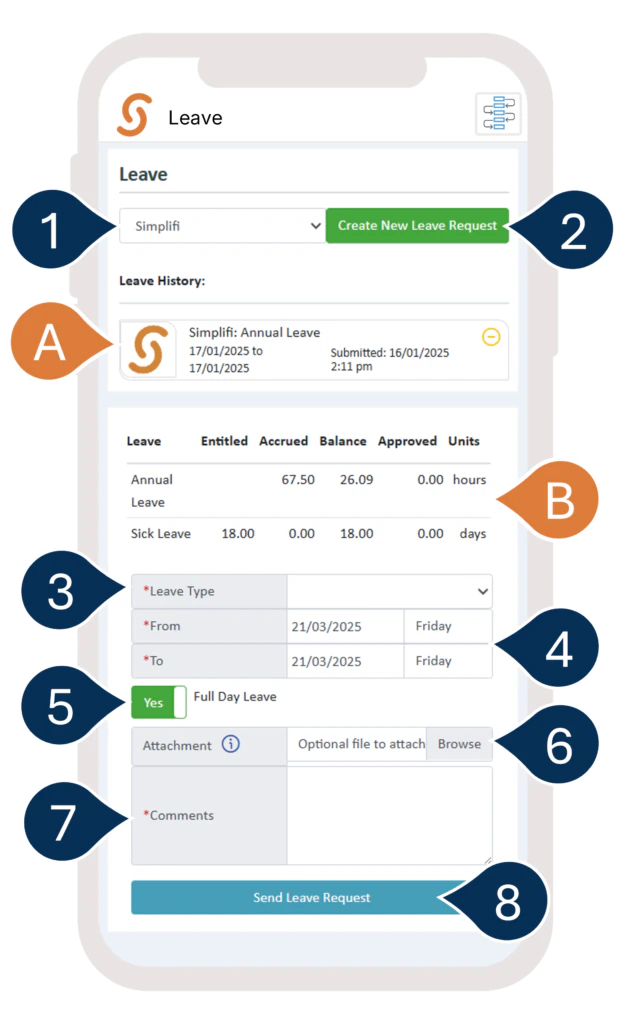
- A. Here, you’ll see a list of your recent leave requests and their status. You can click on any pending requests to make changes or cancel them.
- If you work at multiple locations, select the location you wish to send your request to.
- Select Create New Leave Request.
- B. Here, you can also check your Leave Balances.
- Enter the Leave Type
- Enter the Date Range.
- If you’re applying for a full day off, set the toggle to YES. If you’re applying for part of the day, set the toggle to NO and enter the time range.
- Attach any Supporting Documents (optional).
- Add any Comments (if needed).
- Select Send Leave Request to submit your request.