How to Assign a Staff Member/Casual to a Published Shift
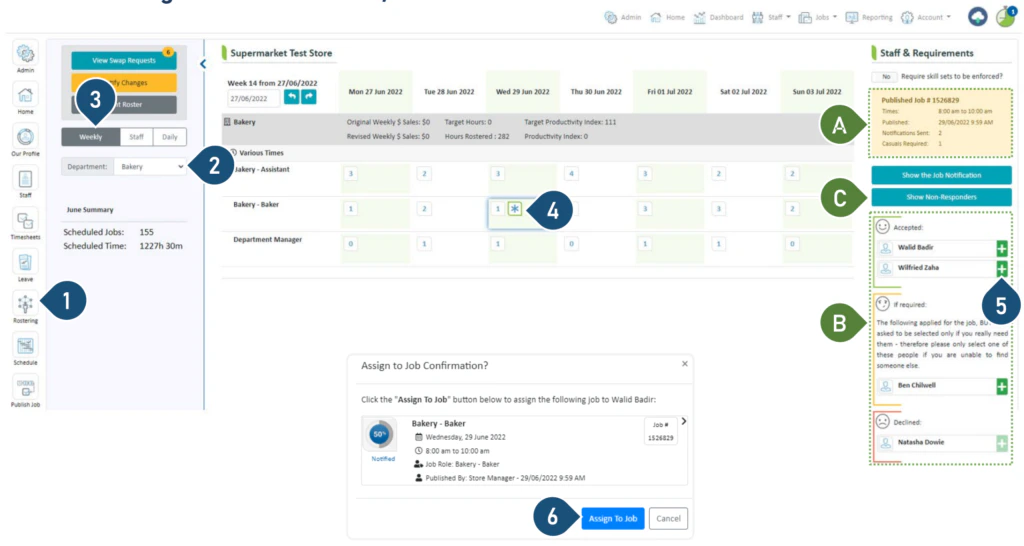
Select the Rostering button.
Select the Department.
Select the Weekly view.
You will see an asterisk where you have published a job – click on it.
Casual job published to find replacement for absent staff.Casual job published for additional staff.
A. A summary of the published job is displayed here.B. The responses to your job are displayed here.
To assign casuals to the shift, click on the green +.
Click Assign to Job.
C. Click here to view the list of casuals who have not responded. You can assign a casual from this list, however, please ensure you have verbal confirmation from the casual before you do so.
Note: The asterisk will disappear once you have filled the job
Was this page helpful?
Assistant
Responses are generated using AI and may contain mistakes.

.png?fit=max&auto=format&n=fTXEPIUfjW4rC1Pi&q=85&s=85d7b852879d29ad2bde9b743307ab0e)