.png?fit=max&auto=format&n=fTXEPIUfjW4rC1Pi&q=85&s=85d7b852879d29ad2bde9b743307ab0e)
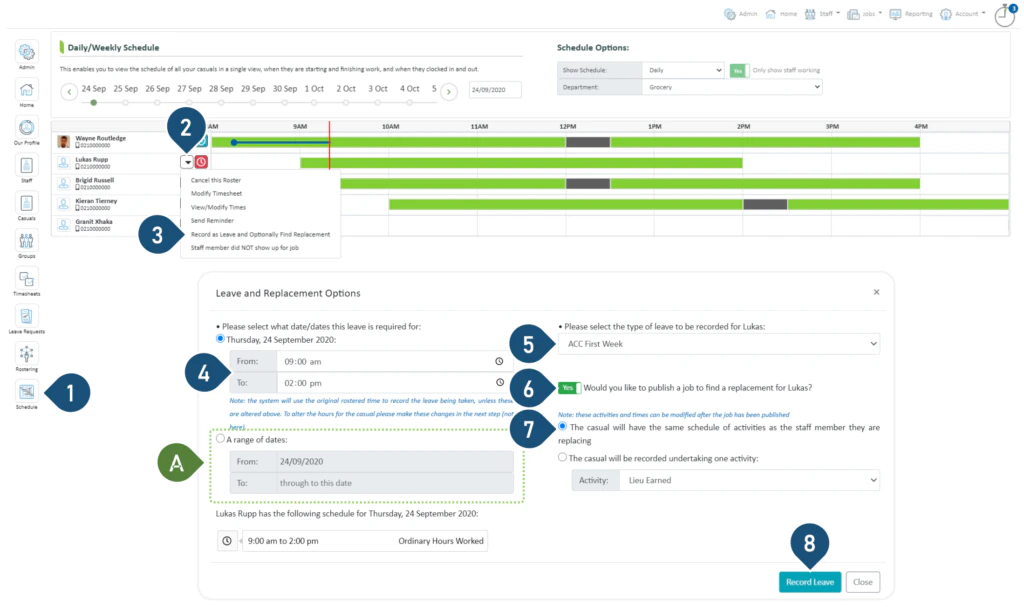
- Select the Schedule button.
- Click on the drop-down menu.
- Select Record as Leave and Optionally Find Replacement.
- Enter the time and duration of the leave. If the staff member is absent for the entire shift, you may leave this unchanged.
- Select the type of leave to be recorded.
- Switch the toggle to Yes if you wish to find a replacement. If not, switch the toggle to No and continue to step 8.
- Select the first option.
- Select Record Leave