There are multiple ways to clock in and out of your shifts. One option is using your phone, which will require you to grant additional permissions to the Simplifi Work App. If you prefer not to use your phone for clocking in and out, you can use the KIOSK to clock in and out for your shift. However, you can still use your phone for other functionalities within the Simplifi Work app. In order to clock in and out using your phone, you will need to be near a Simplifi Beacon. Your manager will tell you where these beacons are located.
Clock In 1 1024x830
You’ll see the clocking in/out options only if:
  • Your phone’s Bluetooth is turned on.
  • You’ve given the Simplifi Work app permission to access your location.
    (Note: The App doesn’t track your location, but the app needs location access to check if you’re near a beacon.)
  • You’re within 2 metres of a beacon.
If you’re rostered to work today, your shift details will show on the home screen.
  1. When you’re ready to start, click Clock In.
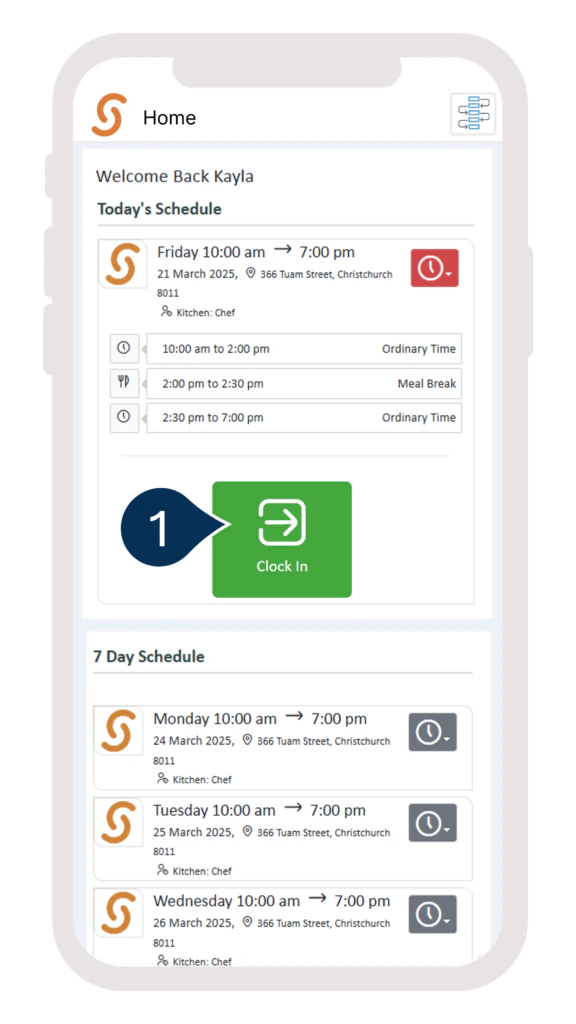
Clock In 2 576x1024
Once you’ve clocked in, the option to clock out will appear.
  1. After clocking in, you’ll also see options to start a break or clock out.
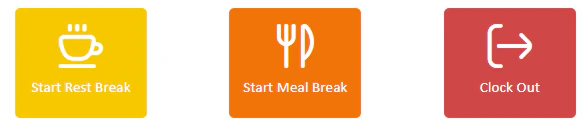
Clock In 3
NOTE: The options to start a paid or unpaid break will only appear if your organisation requires you to clock out for these breaks. Click Clock Out when you finish your shift.