Simplifi Documentation Hub home page
Search...
⌘K
Ask AI
Search...
Navigation
Staff Profiles
How to Find an Employee's Profile
Simplifi Internal Documentation
Simplifi Documentation
On Task Documentation
API Documentation
Simplifi Documentation V1
Simplifi
About Simplifi
Admin/Our Profile Settings
Our Locations
Our Users/Our Additional Users
Our Roles
Our Shifts, Breaks and Working Hours
Clocking In & Out
Timesheet Activities
Leave Requests
Public Holidays & Closedown Periods
File Import Templates
Integrations
Payroll Settings/Payroll Engine
Rostering Settings
Google/Apple Calendars
Job/Timesheet/Staff Information Collected
Third Party Details/Information
Employee Help
Installing The Simplifi App
Setting a Secure Password
Managing Your Calendar
Apply for Additional Jobs/Shifts
Managing Leave
Clocking In and Out Using Your Phone
Forgot Your Password?
Access Your Simplifi Account via Web Browser
Request a Timesheet Modification
Request to Swap Shifts
How to Update your Compliance
Staff Profiles
Staff Profiles Overview
How to Terminate a Staff Member/Casual
How to Assign the Company Manager
How to Reactivate a User
How to Make a User Inactive
How to Promote an Employee to a User
How to Reset an Employee's Password
How to Add a Manually Maintained Employee
How to Set Up a New Employee from a Sync
How to Find an Employee's Profile
Staff Compliance
What is a Group?
Staff Rostering
Staff Rostering Overview
How to Mark an Absence on the Roster
How to Change the Shift Times on a Roster
How to Add a Staff Member to the Roster
How to Edit or Cancel a Job
Relievers Help
Jobs Help
How to View the Daily Schedule
How to Add a Staff Member to a Roster
Time, Attendance & Approvals
Time, Attendance & Approvals Overview
Staff Hours Help
Timesheets Help
How to Clock In/Out on Behalf of a Staff Member
How to Send a Shift Reminder to a Staff Member
How to Process a Shift Swap Request
How to Edit or Cancel a Published Shift
How to Assign a Staff Member/Casual to a Published Shift
How to Add Lieu Earned, Overtime or Another Activity on the Roster
How to Change the Times of a Shift
How to Delete a Shift from the Roster
Managing Schedules with the Multi-Period Shift Option
Using the Simplifi KIOSK on Apple Devices
Reporting
Reporting Overview
How to Create New Reporting Roles
Casual Staff Management
Casual Staff Management Overview
How to Assign a Casual with Alternative Responses
How to Unassign a Casual from a Job
Leave Management
Leave Management Overview
How to Change Decisions for a Leave Request
How to Process a Leave Request
How to Record Leave for a Staff Member
How to Endorse a Leave Request
Payroll Integration
Payroll Integration Overview
Payroll Processing Method
Payroll Processing Method – CSV File
Release Notes
January 2026
Staff Profiles
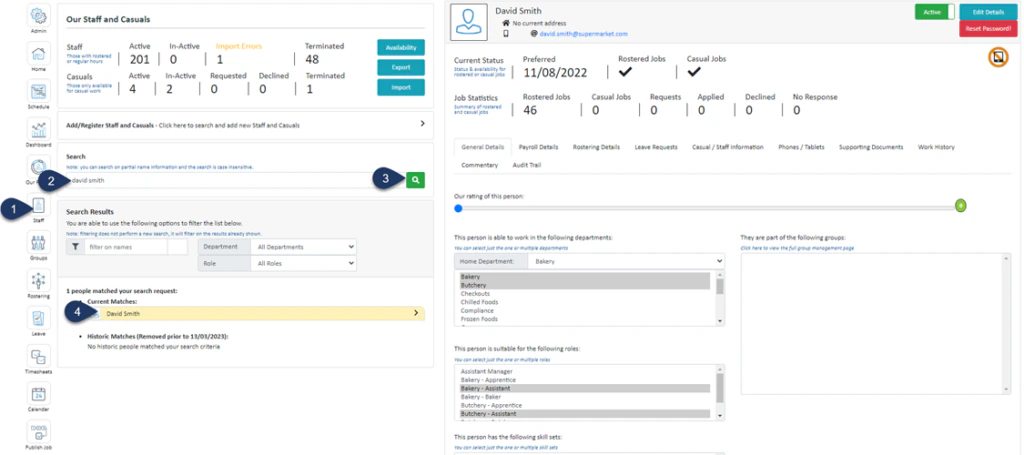
How to Find an Employee's Profile
Click
Staff
(If you cannot see the ‘
Staff
’ button, then you will need to ask your store administrator to grant you access)
Type in the name or partial name of the employee
Click the
Search Icon
Select the
Employee
The employee’s profile will appear on the right-hand side.
Was this page helpful?
Yes
No
How to Set Up a New Employee from a Sync
Staff Compliance
⌘I
Assistant
Responses are generated using AI and may contain mistakes.
Suggestions
How can I Publish a job?
How can I Change Contracted Hours?
I have Forgotten my Password. What can I do?
Contact support