Best Practice for Updating Job Times Once a Job Is Assigned
If a reliever has already been assigned and you need to change the job times, make the update in the timesheet, not in the Job Details.Editing and republishing the job from Job Details can cause the job hours to calculate incorrectly. Updating through the timesheet keeps everything accurate and also preserves the original job history and audit trail.How to update job times after a job has been assigned:
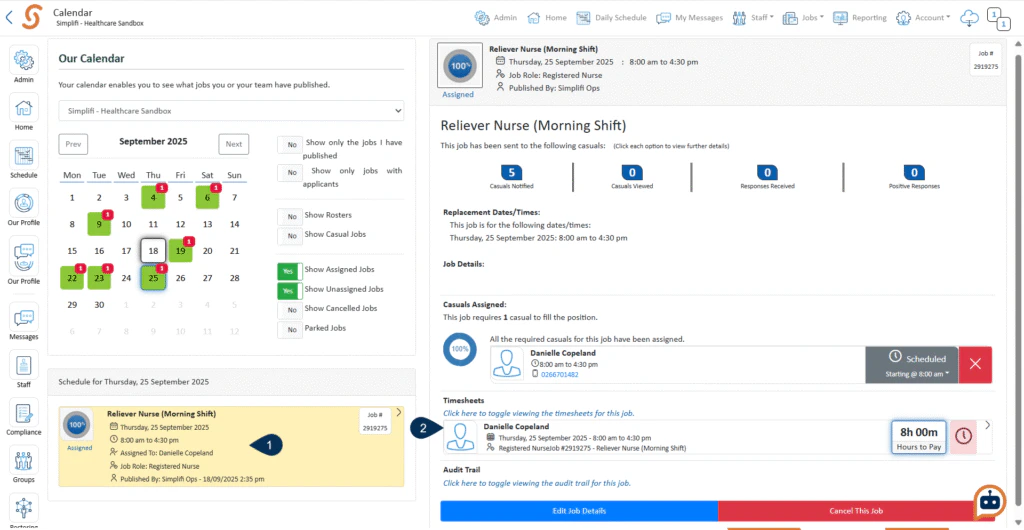
Find the job you want to update.
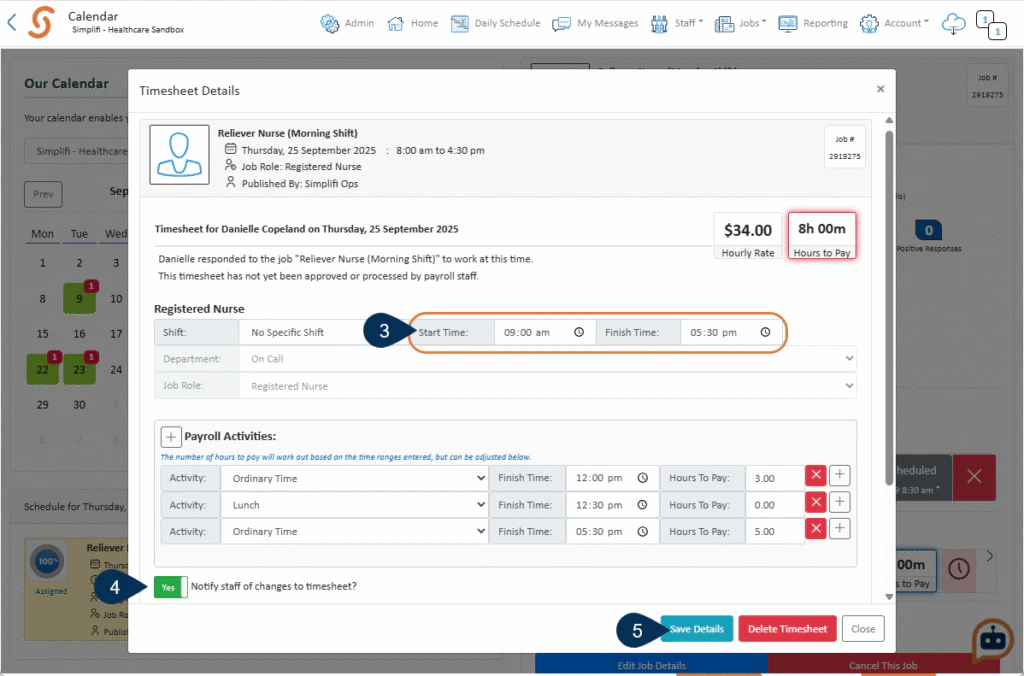
Open the job’s timesheet.
Enter the new start and/or finish time.
Switch on “Notify staff of changes to timesheet?” to send a notification to the reliever.
Click Save Details to apply the changes.
Was this page helpful?
Assistant
Responses are generated using AI and may contain mistakes.

.png?fit=max&auto=format&n=fTXEPIUfjW4rC1Pi&q=85&s=85d7b852879d29ad2bde9b743307ab0e)