
.png?fit=max&auto=format&n=fTXEPIUfjW4rC1Pi&q=85&s=85d7b852879d29ad2bde9b743307ab0e)
Staff Settings
| Setting | Description |
|---|---|
| Head office code | This sets a code for the head office. It will then allow you to enter in a head office code for a staff member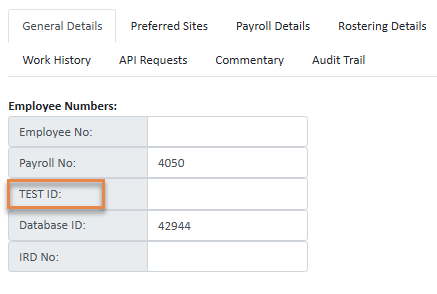 |
| Staff are managed at head office | This means that staff can only be edited, added and removed at head office, and at none of the local level organisations |
| Temp staff can serach for and add themselves to organisations within this head office | This lets temp staff that are registering with Simplifi apply to register with organisations within the head office. If this is unticked, then the head office itself will be the only organisation that appears in the search bar. |
| Initial vetting of temp staff is done at each organisation, then head office approves | Allows temp staff to be semi managed by the organisation they apply at. If the temp staff applies to an organisation under the head office to become preferred, then the local branch can approve and decline the temp staff, but final approval (not decline) rests with the head office. |
| Look up travel distances for all temp staff in all organisations | This displays the travel distance for all temp staff in all organisations under this head office in the preferred location tab.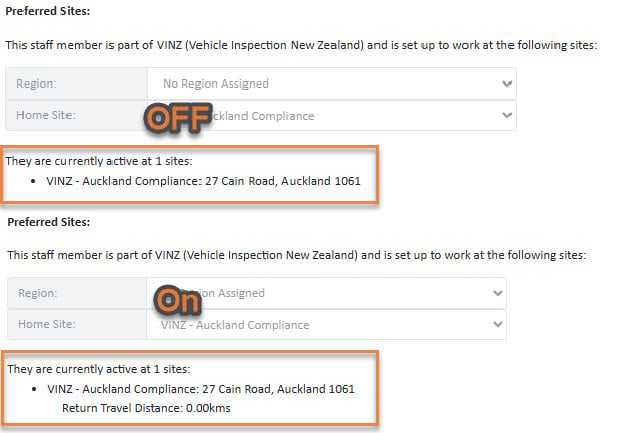 Be careful with this toggle, as there is a cost associated everytime you calculate the distance. |
| When viewing temp staff avalilability, display the organisation names where temp staff are working | |
| Default new temp staff to have broadcast disabled | |
| Allow broadcast only to organisations within same head office | |
| Can delete temp staff |