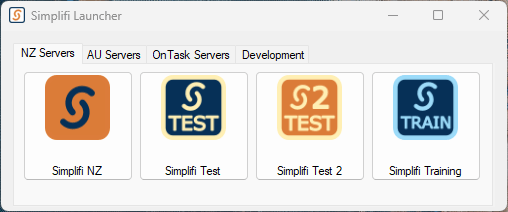
When opening the Simplifi Launcher, you will find 4 different categories of JAS: NZ Servers, AU Servers, OnTask Servers and Development.All JAS follow the same format.
These versions of JAS are there to allow you to test, make changes and experiment in an environment that the public cannot access. In the test servers, the sending of notifications is disabled so you can press buttons without worrying that you’ve just sent the head of foodstuffs a phone notification.Live or Simplifi NZ are the live servers. From modifying settings on this JAS, you will modify settings for the live users of Simplifi.
Note that the data on the test and training servers is from the past; it is one month behind the data that is on the live system.Testservers are the servers for testing. These update their databases from the live server, but changing settings on the test servers has no effect on the live users and live database. Therefore you can test out settings on the test servers without worrying about screwing up things for the live users.Training servers are similar to the test servers in that you can modify real data from the live servers, but the difference is these are customer facing and meant for training up new staff or new organisations on using Simplifi.Note that the data on the test and training servers is from the past; it is one month behind the data that is on the live system.
Here is a full list of the different services/servers you can access from the Simplifi Launcher:
Name
System
Accessible by?
Purpose
Simplifi NZ
Simplifi NZ
Public
This is the LIVE server for Simplifi NZ that users have access to
Simplifi Test
Simplifi NZ
Dev/Ops
This is a test server for experimenting and testing
Simplifi Test 2
Simplifi NZ
Dev/Ops
This is a second test server for experimenting and testing
Simplifi Training
Simplifi NZ
Semi Public
This server is used to train users on Simplifi. It cannot be accessed without our staff, but will be viewed by the public
Simplifi AU
Simplifi AU
Public
This is the LIVE server for Simplifi AU that users have access to
Simplifi AU Test
Simplifi AU
Dev/Ops
This is a test server for experimenting and testing
OnTask Live
OnTask
Public
This is the LIVE server for OnTask that users have access to
OnTask Test
OnTask
Dev/Ops
This is a test server for experimenting and testing
OnTask Training
OnTask
Semi Public
This server is used to train users on OnTask. It can be accessed by Foodstuffs as they use it to train their staff
JadeEnv
DEV
Dev
This is the environment in which all the systems are developed.
Simplifi Dev
DEV
Dev
This is the JAS that the development team edit
Was this page helpful?
Assistant
Responses are generated using AI and may contain mistakes.

.png?fit=max&auto=format&n=fTXEPIUfjW4rC1Pi&q=85&s=85d7b852879d29ad2bde9b743307ab0e)
.jpg?fit=max&auto=format&n=PUDMWwumfcNyslva&q=85&s=2b2c68eb1587b9f496cbee7859a3cf3b)