
.png?fit=max&auto=format&n=fTXEPIUfjW4rC1Pi&q=85&s=85d7b852879d29ad2bde9b743307ab0e)
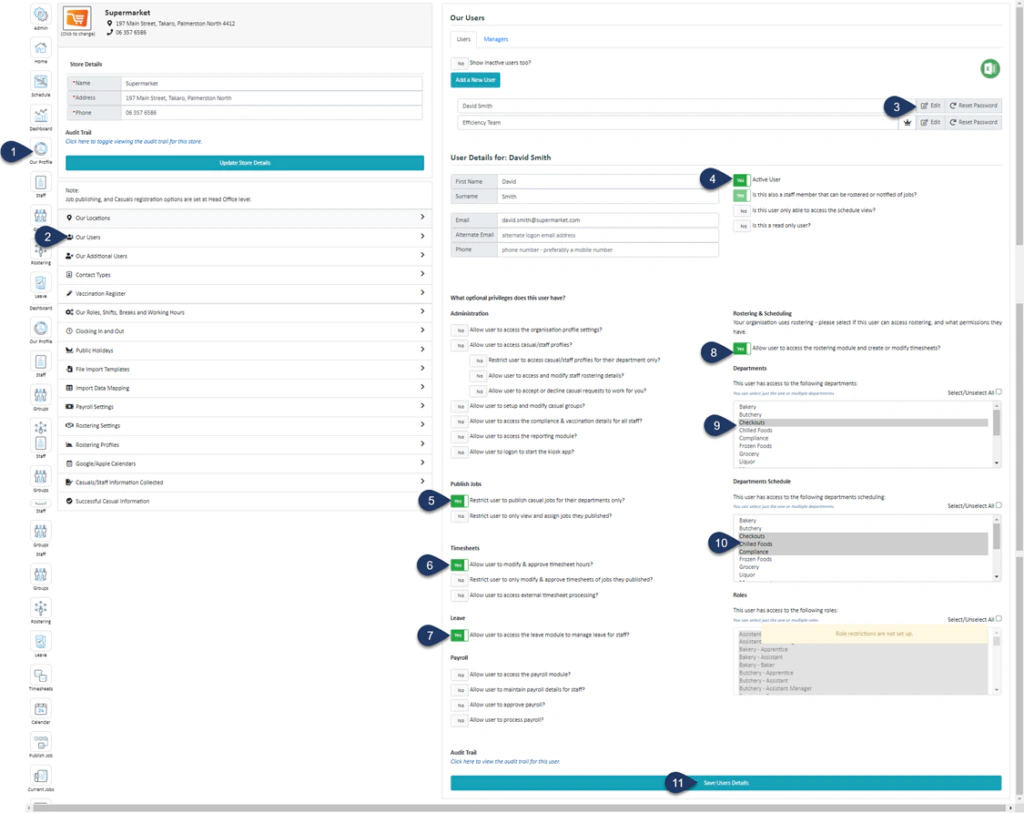
- Select Our Profile
- Select Our Users
- Select **Edit **next to the user you wish to edit
- Make sure this is **YES **– Active, if you ever need to revoke access then you can switch this toggle to NO and Save, making the user inactive
- Switch this toggle to **YES **to restrict the user to publishing casual jobs for their departments only
- Switch this toggle to **YES **to allow the user to access the rostering module
- Switch this toggle to **YES **to allow the user to approve or modify timesheets
- Switch this toggle to **YES **to allow the user to manage leave requests
- Select the department they will be able to access. According to your settings from steps 5-7, this user will be able to manage rosters, approve timesheets, and manage leave for all the departments that are selected here
- Select all the departments this user will be able to view the **schedule **for – This is a view-only access, they will not be able to make modifications
- Select Save User Details