> ## Documentation Index
> Fetch the complete documentation index at: https://docs.simplifi.work/llms.txt
> Use this file to discover all available pages before exploring further.
# Request to Swap Shifts
You can request to swap a shift with another staff member via Simplifi. The request will be sent to your manager for approval. Make sure you have consent from the staff member you want to swap with before submitting the request.
1. Locate your shift on your **Home Screen** or in your **Calendar**.
2. Select the **grey clock icon** next to your shift.
3. Select **Swap Shift**.
4. Switch the toggle to **YES** if you have consent from the staff member you want to swap with.
5. Choose the **name of the staff member**, **date**, and **shift**.
6. Provide a **reason** for the swap.
7. Select **Send Swap Request**.
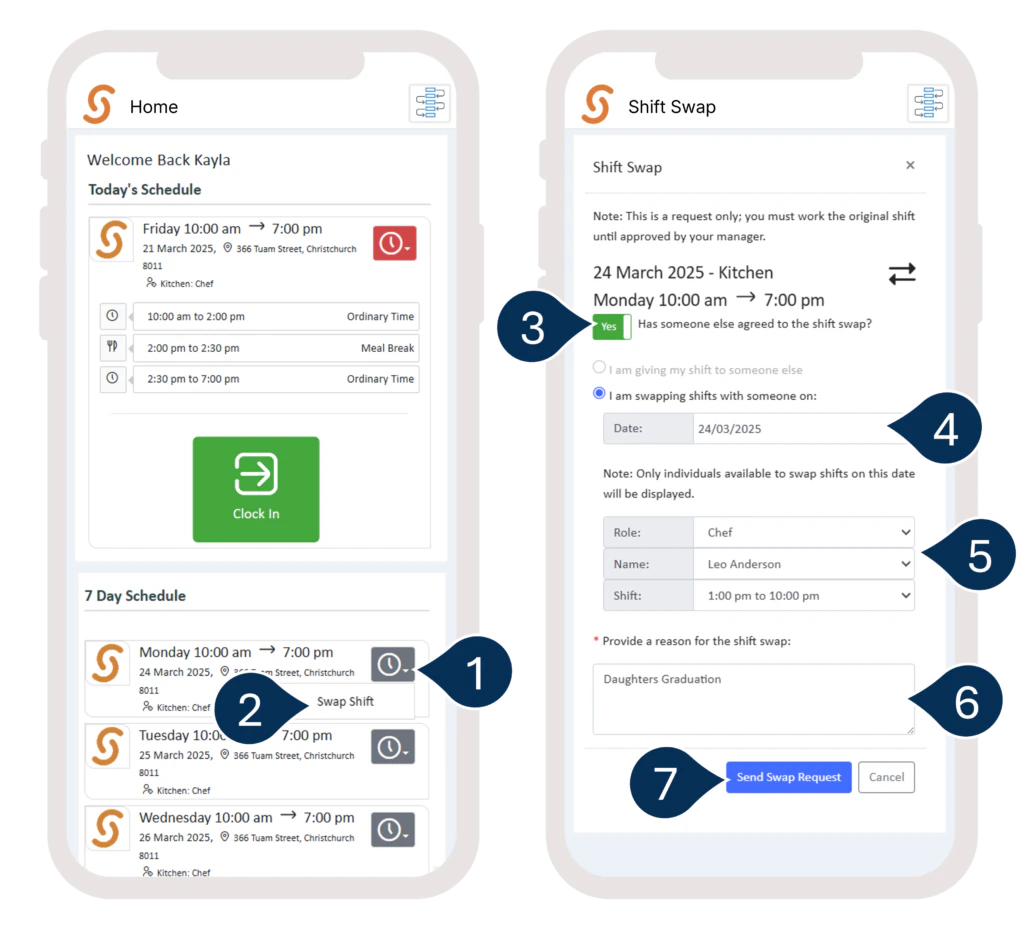 Your shift swap request will be sent for approval.