> ## Documentation Index
> Fetch the complete documentation index at: https://docs.simplifi.work/llms.txt
> Use this file to discover all available pages before exploring further.
# JAS Setup
Leave can be enabled for an organisation through [**JAS**](/job-queue). The following configuration options are available:
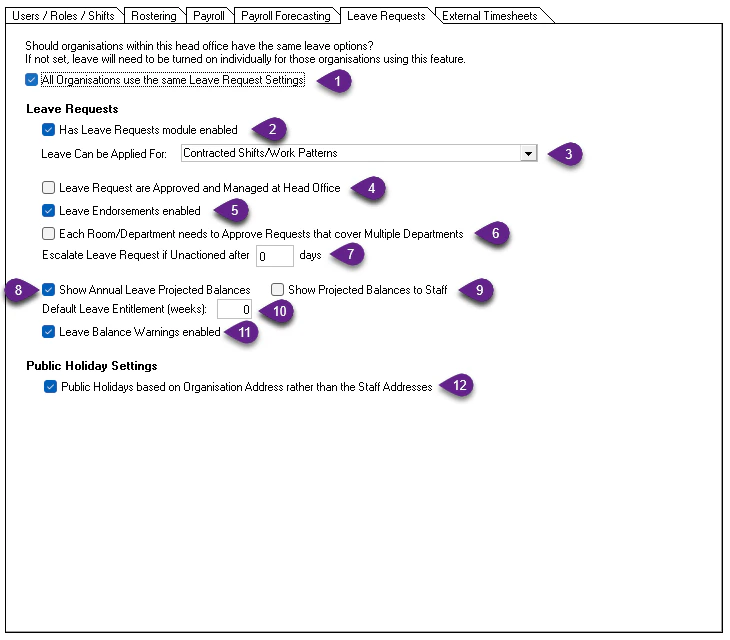 When configuring leave at **Head Office** level, this option forces all local organisations to use the same leave settings.
**Recommended:** Enable this to ensure consistency across the group and simplify setup and ongoing management.
Enables the Leave module for the organisation. When turned on:
* The **Leave** module appears in menus
* The **Leave Requests** section appears in **Our Profile**
Determines which types of work staff can request leave for:
* **Contracted Hours / Work Patterns**
When configuring leave at **Head Office** level, this option forces all local organisations to use the same leave settings.
**Recommended:** Enable this to ensure consistency across the group and simplify setup and ongoing management.
Enables the Leave module for the organisation. When turned on:
* The **Leave** module appears in menus
* The **Leave Requests** section appears in **Our Profile**
Determines which types of work staff can request leave for:
* **Contracted Hours / Work Patterns**
Most restrictive. Staff can only apply for leave on days they are contracted or expected to work on an ongoing basis. Contracted Hours are configured in the **Staff** module.
* **Rostered Shifts / Contracted Hours / Work Patterns**
Allows leave requests for any rostered shift, including manually added roster shifts.
* **Casual Shifts / Rostered Shifts / Contracted Hours / Work Patterns**
Allows leave requests for **any** time period.
**Recommended for most organisations**, as it avoids user confusion and unnecessary restrictions. The ability for staff to apply for casual leave can be turned on and off individually in their **Staff** profile, so there is still a good degree of flexibility.
If enabled, local organisations cannot access the Leave module. All leave requests are sent to Head Office for management.
This option is **rarely used** since the introduction of **Leave Endorsements**, which provide more flexible approval workflows.
Only recommended where staff are fully managed by Head Office.
Note that enabling this willl make the organisations filter appear in the leave filters.
Enables the Leave Endorsements feature. This allows one user (e.g. a Department Manager) to endorse a leave request, with final approval completed by another user (e.g. a Store Manager).
If staff work across multiple Rooms or Departments and submit a leave request that affects more than one area, enabling this option requires **each affected Room or Department** to approve the request before it can be finalised.
If a leave request is not approved or declined within the specified number of days, a reminder email is sent to the email addresses nominated in the **Additional Users** section of **Our Profile**.
* Set to **0 days** to disable reminders.
Calculates and displays projected leave balances for future dates based on current balances and leave entitlements. Requires a leave entitlement to calculate.
These projections appear on leave requests to assist decision-makers.
Displays projected leave balances to staff while they are submitting leave requests, helping them understand their expected balance at the time of leave.
Leave entitlements can be set individually for each staff member in the **Staff** module. If left blank, the system will automatically apply the number of weeks specified here.
Displays a warning when approving leave if the staff member does not have sufficient leave balance.
Approvers can still proceed if required.
Uses the **organisation’s address**, rather than the staff member’s address, to determine applicable public holidays.
Useful for organisations near state or regional boundaries where staff may live in areas with different public holidays.