> ## Documentation Index
> Fetch the complete documentation index at: https://docs.simplifi.work/llms.txt
> Use this file to discover all available pages before exploring further.
# How to Test a Beacon
To perform a beacon test on the \*\*OnTask \*\*app, you need to:
1. Be logged in as a staff member.
2. Have Bluetooth turned on.
3. Grant location permissions to the \*\*OnTask \*\*app.
You do not need to be a staff member at the company to perform the test. However, you will need to be a staff member at the company to use the beacon for clocking in and out.
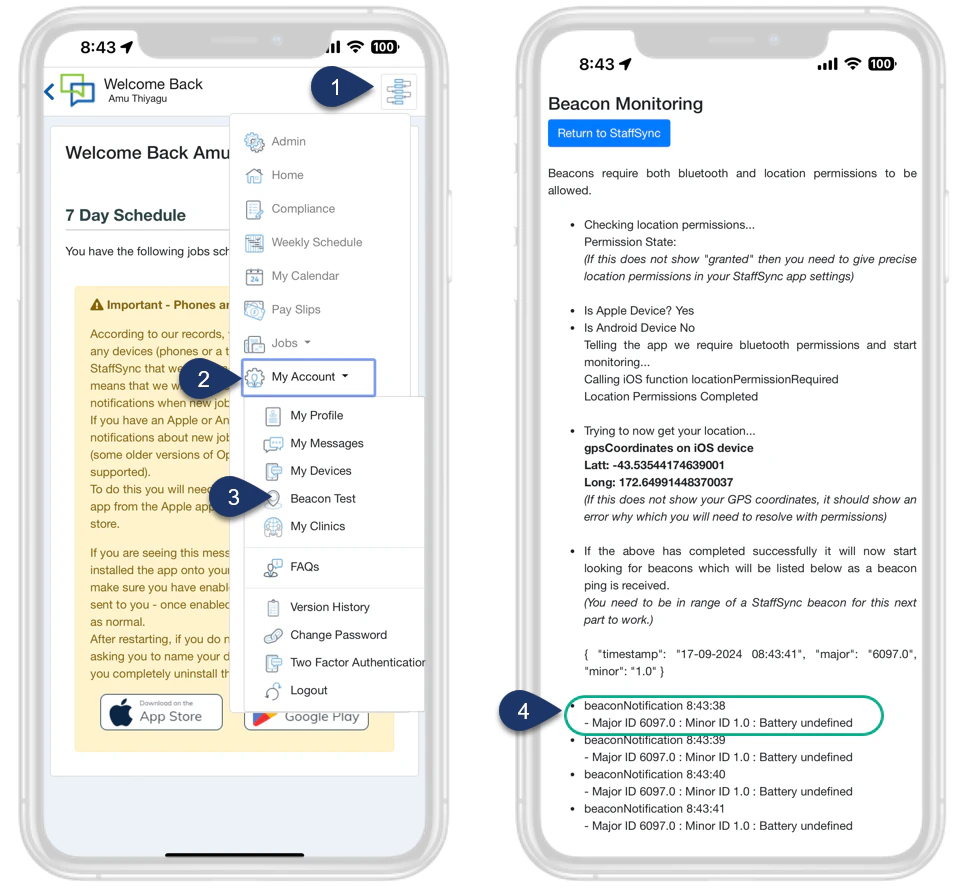 1. Select the **Menu**.
2. Select **Account**.
3. Select **Beacon Test**.
4. If you have successfully set up the beacon, you will see the beacon’s Major and Minor IDs displayed here. Please note that the IDs shown are in decimal format, not HEX.
1. Select the **Menu**.
2. Select **Account**.
3. Select **Beacon Test**.
4. If you have successfully set up the beacon, you will see the beacon’s Major and Minor IDs displayed here. Please note that the IDs shown are in decimal format, not HEX.