> ## Documentation Index
> Fetch the complete documentation index at: https://docs.simplifi.work/llms.txt
> Use this file to discover all available pages before exploring further.
# How to Process a Shift Swap Request
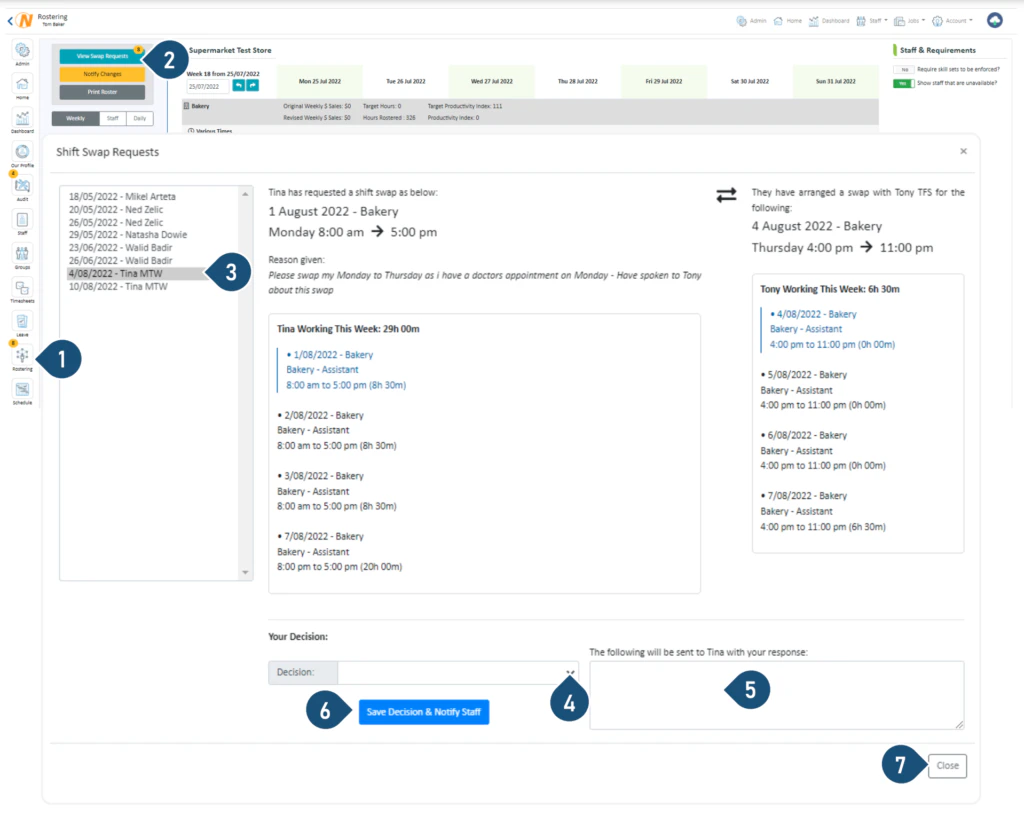 1. Select the **Rostering button** – if this button has a number on the top left corner, it indicates there are swap requests waiting for you to action.
 2. Select **View Swap Requests**.
3. Select the Request you wish to view.
4. Click one of the decisions:
* Approve Request – Remove the timesheet and you will find a replacement.
* Approve Request – Swap timesheets with an alternative provided by the Requester or Give Extra Shift.
* Decline Request – They are still required to work.
5. Enter any comments you wish to send the Requester.
6. Select **Save Decision & Notify Staff**.
7. Select **Close**.
2. Select **View Swap Requests**.
3. Select the Request you wish to view.
4. Click one of the decisions:
* Approve Request – Remove the timesheet and you will find a replacement.
* Approve Request – Swap timesheets with an alternative provided by the Requester or Give Extra Shift.
* Decline Request – They are still required to work.
5. Enter any comments you wish to send the Requester.
6. Select **Save Decision & Notify Staff**.
7. Select **Close**.