> ## Documentation Index
> Fetch the complete documentation index at: https://docs.simplifi.work/llms.txt
> Use this file to discover all available pages before exploring further.
# How to Make a User Inactive
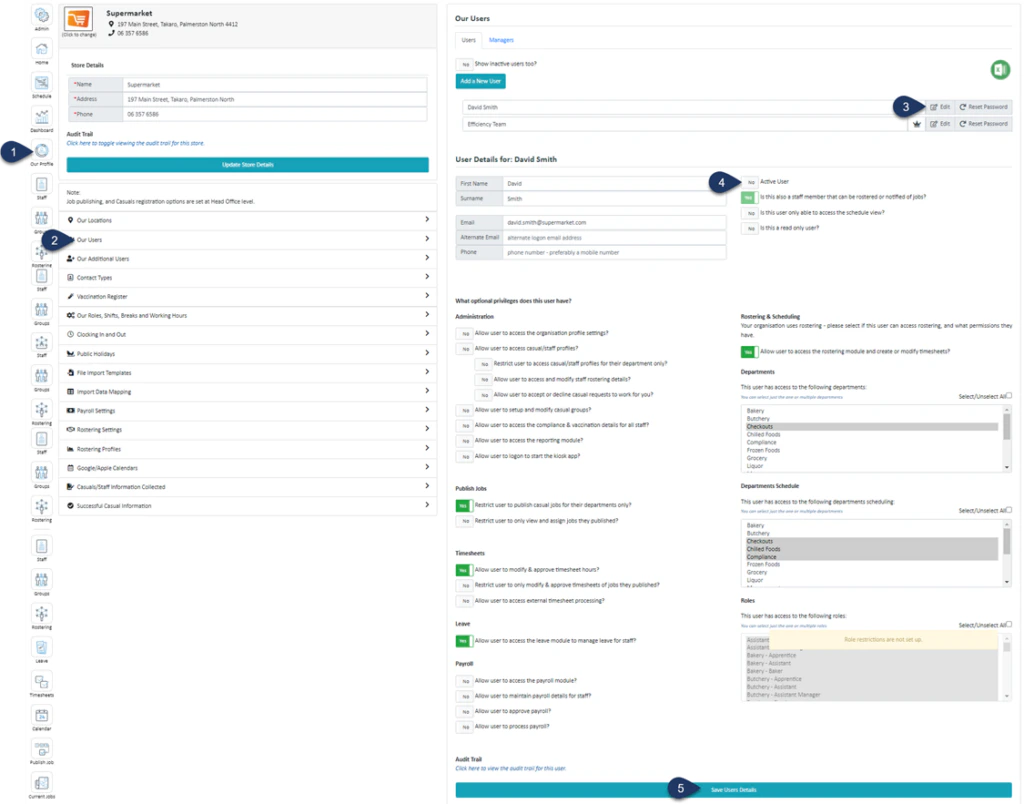 1. Select **Our Profile**
2. Select **Our Users**
3. Select **Edit** next to the user you wish to inactivate
4. Switch the **‘Active User’** toggle to **NO**
5. Select **Save User Details**
1. Select **Our Profile**
2. Select **Our Users**
3. Select **Edit** next to the user you wish to inactivate
4. Switch the **‘Active User’** toggle to **NO**
5. Select **Save User Details**