> ## Documentation Index
> Fetch the complete documentation index at: https://docs.simplifi.work/llms.txt
> Use this file to discover all available pages before exploring further.
# How to Make a New Timesheet Activity
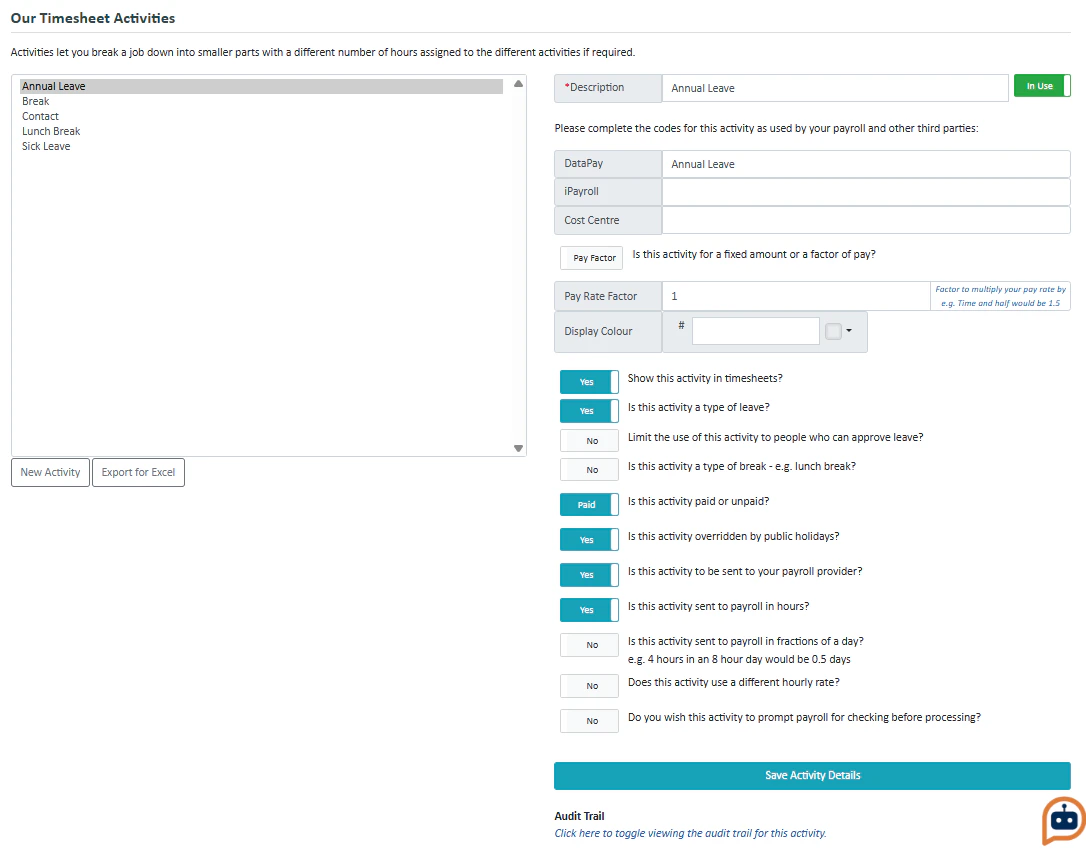 Timesheet activities are activities that can be added to a timesheet in place of hours worked. Activities can just be during a day e.g. lunch break, or replace a whole day e.g. sick leave.
To make a new timesheet activity, press **Timesheet Activities** on the far left. Then press **New Activity** under the list of current timesheet activities.
You will need to enter the payroll codes for the activity for it to be recognised by your payroll provider.
Press **Save Activity Details** to save it as a new activity.
Timesheet activities are activities that can be added to a timesheet in place of hours worked. Activities can just be during a day e.g. lunch break, or replace a whole day e.g. sick leave.
To make a new timesheet activity, press **Timesheet Activities** on the far left. Then press **New Activity** under the list of current timesheet activities.
You will need to enter the payroll codes for the activity for it to be recognised by your payroll provider.
Press **Save Activity Details** to save it as a new activity.