> ## Documentation Index
> Fetch the complete documentation index at: https://docs.simplifi.work/llms.txt
> Use this file to discover all available pages before exploring further.
# How to Clock In/Out on Behalf of a Staff Member
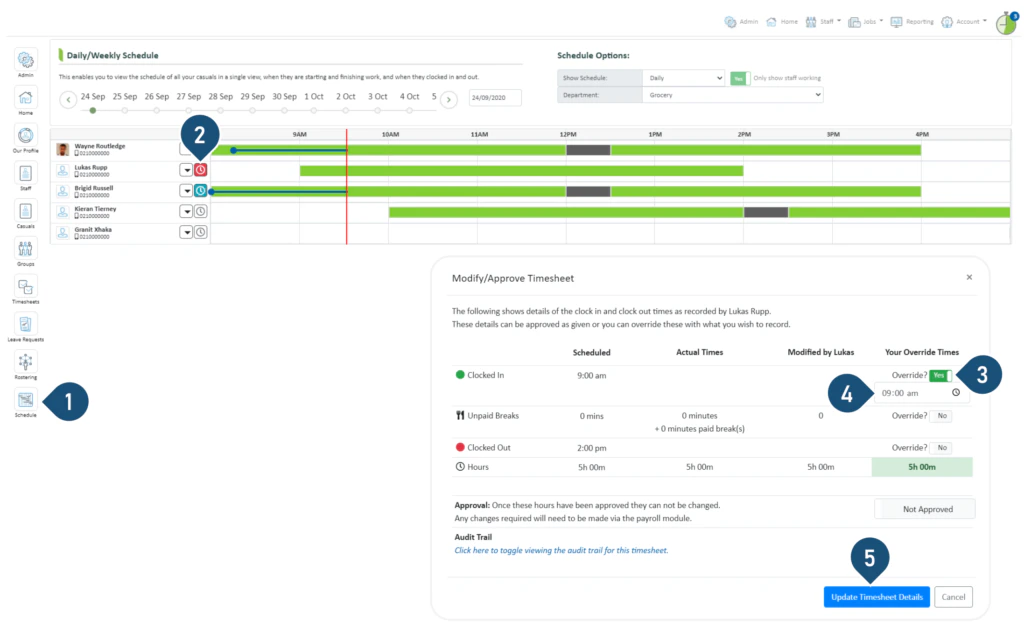 1. Select the **Schedule** button.
2. Click on the clock icon.
1. Select the **Schedule** button.
2. Click on the clock icon.
 3. Switch the **Override?** toggle to **Yes**.
4. Enter the time.
5. Select **Update Timesheet Details**.
3. Switch the **Override?** toggle to **Yes**.
4. Enter the time.
5. Select **Update Timesheet Details**.