> ## Documentation Index
> Fetch the complete documentation index at: https://docs.simplifi.work/llms.txt
> Use this file to discover all available pages before exploring further.
# How to Change Decisions for a Leave Request
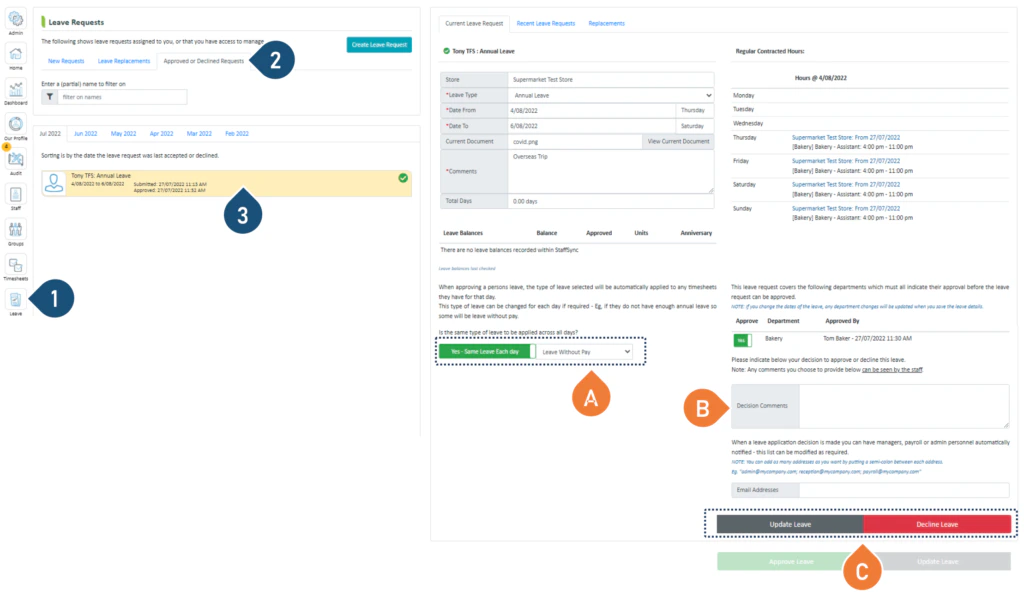 1. Select the **Leave** button.
2. **Select Approved or Declined Request**.
3. Click on the Leave Request you wish to view.
You can make the following changes:
A. Click here to change the type of leave you are approving.
B. Add or change decision comments.
C. Select Update Leave or Approve or Decline to change your decision.
1. Select the **Leave** button.
2. **Select Approved or Declined Request**.
3. Click on the Leave Request you wish to view.
You can make the following changes:
A. Click here to change the type of leave you are approving.
B. Add or change decision comments.
C. Select Update Leave or Approve or Decline to change your decision.