> ## Documentation Index
> Fetch the complete documentation index at: https://docs.simplifi.work/llms.txt
> Use this file to discover all available pages before exploring further.
# How to Add Lieu Earned, Overtime or Another Activity on the Roster
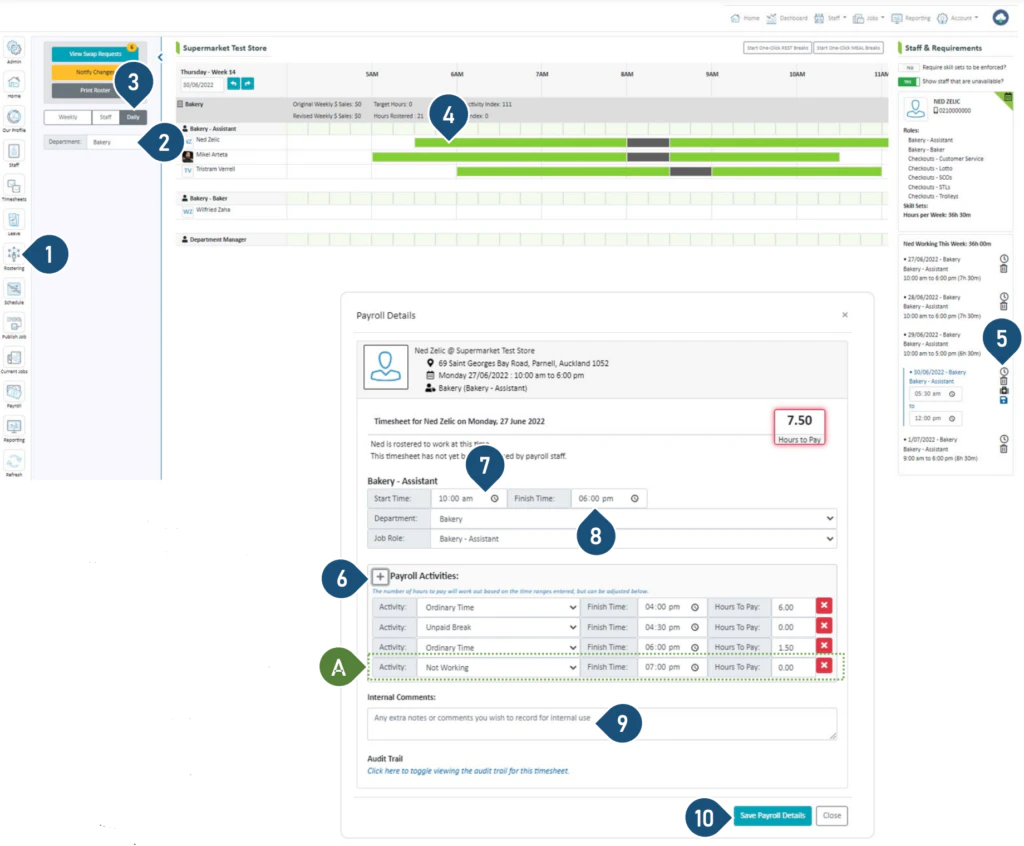 1. Select the **Rostering** button.
2. Select the Department.
3. Select the **Daily** view.
4. Click on the shift.
5. Click on the clock to edit the details of the shift.
6. Click the + to add another payroll activity.
A. An extra activity table will now appear.
7. Choose an activity from the drop-down menu e.g. Lieu Earned, Overtime etc.
8. Adjust the end times accordingly.
9. Leave any comments for internal records.
10. Click **Save Payroll Details**.
Note: The different colours of the shift bar represent different timesheet activities
1. Select the **Rostering** button.
2. Select the Department.
3. Select the **Daily** view.
4. Click on the shift.
5. Click on the clock to edit the details of the shift.
6. Click the + to add another payroll activity.
A. An extra activity table will now appear.
7. Choose an activity from the drop-down menu e.g. Lieu Earned, Overtime etc.
8. Adjust the end times accordingly.
9. Leave any comments for internal records.
10. Click **Save Payroll Details**.
Note: The different colours of the shift bar represent different timesheet activities