> ## Documentation Index
> Fetch the complete documentation index at: https://docs.simplifi.work/llms.txt
> Use this file to discover all available pages before exploring further.
# Authentication
The Simplifi API is in **Developer Preview**. While not all features are finalised, we encourage you to explore and share your feedback — including thoughts on endpoint design, response structure, or areas where documentation could be clearer.
## Overview
The Simplifi API authenticates using OAuth 2.0 with the client credentials grant flow. This is a machine-to-machine flow designed for server-side integrations.
Your server exchanges a Client ID and Client Secret for a short-lived access token (1 hour), which is then used to authenticate the API request.
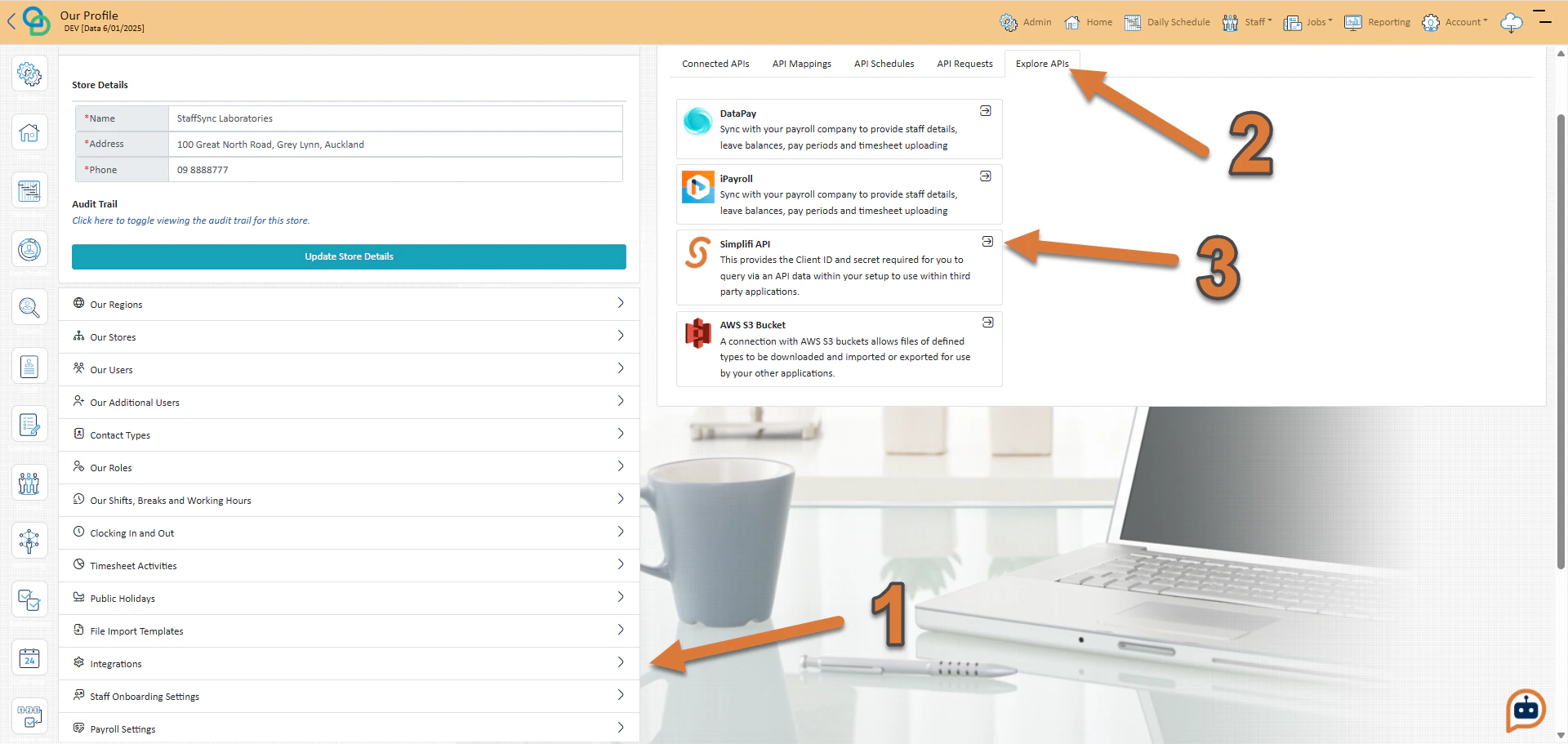
To obtain your Client ID and Client Secret:
1. Press **Integrations** under **Our Profile**
2. Press **Explore APIs**
3. Press the select button for the **Simplifi API**
You will now see the **Client ID**, **Client Secret** as well as the **Base URL** and **Authorisation URL**.
 ## Tokens
OAuth 2.0 works by passing your Client ID, Client Secret to the authentication server in exchange for a short-lived access token. This token represents your application and **must be included** in the Authorization **request headers** of every API request.
OAuth 2.0 Tokens expire exactly 1 hour after they are generated for you
When a token expires, simply repeat the authentication request to receive a new one. We recommend that you build a token manager in your application that caches the token and automatically re-authenticates when a 401 response is received.
## JSON Response
A successful authentication request returns a JSON response like this:
```json JSON wrap theme={null}
{"__type":"SSJSON_Token_Access","access_token":"example_access_token","expires_in":3600,"refresh_token":"example_refresh_token","scope":"read","token_type":"Bearer"}
```
## Tokens
OAuth 2.0 works by passing your Client ID, Client Secret to the authentication server in exchange for a short-lived access token. This token represents your application and **must be included** in the Authorization **request headers** of every API request.
OAuth 2.0 Tokens expire exactly 1 hour after they are generated for you
When a token expires, simply repeat the authentication request to receive a new one. We recommend that you build a token manager in your application that caches the token and automatically re-authenticates when a 401 response is received.
## JSON Response
A successful authentication request returns a JSON response like this:
```json JSON wrap theme={null}
{"__type":"SSJSON_Token_Access","access_token":"example_access_token","expires_in":3600,"refresh_token":"example_refresh_token","scope":"read","token_type":"Bearer"}
```