> ## Documentation Index
> Fetch the complete documentation index at: https://docs.simplifi.work/llms.txt
> Use this file to discover all available pages before exploring further.
# Authentication Examples
The Simplifi API is in **Developer Preview**. While not all features are finalised, we encourage you to explore and share your feedback — including thoughts on endpoint design, response structure, or areas where documentation could be clearer.
## Code Example
You can see an example of a token manager in Python below:
```python theme={null}
import time
import requests
CLIENT_ID = "your_client_id"
CLIENT_SECRET = "your_client_secret"
AUTH_URL = "https://dev.simplifi.work/oauth/token"
BASE_URL = "https://dev.simplifi.work/api"
class SimplifiClient:
def __init__(self, client_id: str, client_secret: str):
self.client_id = client_id
self.client_secret = client_secret
self._token: str | None = None
self._token_expiry: float = 0
def get_access_token(self) -> str:
response = requests.post(
AUTH_URL,
data={"grant_type": "client_credentials"},
auth=(self.client_id, self.client_secret),
)
response.raise_for_status()
data = response.json()
self._token = data["access_token"]
# Subtract 30 seconds as a buffer so we refresh slightly before expiry
self._token_expiry = time.time() + data["expires_in"] - 30
return self._token
# Is the token expired? if so _get_access_token
def get_valid_token(self) -> str:
if self._token is None or time.time() >= self._token_expiry:
self.get_access_token()
return self._token
def request(self, method: str, path: str, **kwargs) -> dict:
token = self.get_valid_token()
response = requests.request(
method,
f"{BASE_URL}{path}",
headers={"Authorization": f"Bearer {token}"},
**kwargs,
)
if response.status_code == 401:
# Token rejected by server — force a refresh and retry once
self._token = None
token = self._get_valid_token()
response = requests.request(
method,
f"{BASE_URL}{path}",
headers={"Authorization": f"Bearer {token}"},
**kwargs,
)
response.raise_for_status()
return response.json()
def get_employee(self, employee_id: str) -> dict:
return self.request("GET", f"/v1/employees/{employee_id}")
def get_employees(self) -> list:
return self.request("GET", "/v1/employees")
# Usage
client = SimplifiClient(CLIENT_ID, CLIENT_SECRET)
employee = client.get_employee("123")
```
Note that when the `request` method in the `SimplifiClient` class is called, it gets a valid token by calling `get_valid_token` which checks if an hour has passed (minus 30 seconds) and if so, then it fetches a new, valid token by calling `get_access_token` .
## Testing out authentication using Postman
Here's an example of us requesting for a list of employees in [Postman](www.postman.com). Postman is a SAAS that offers a free plan that you could use to test out the Simplifi API.
Start by making a new request under your collection, and navigate to the **Authorisation** tab.
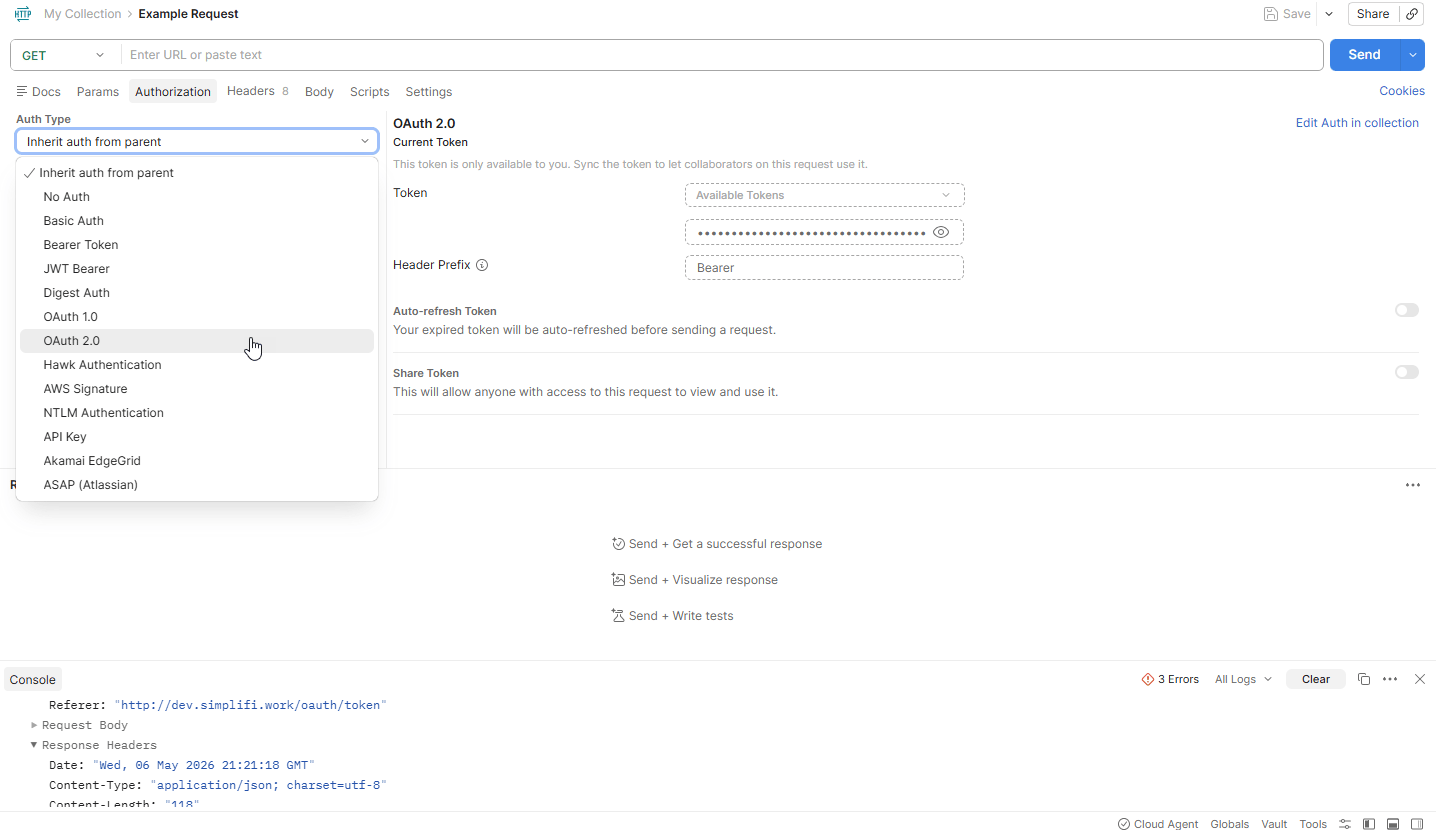
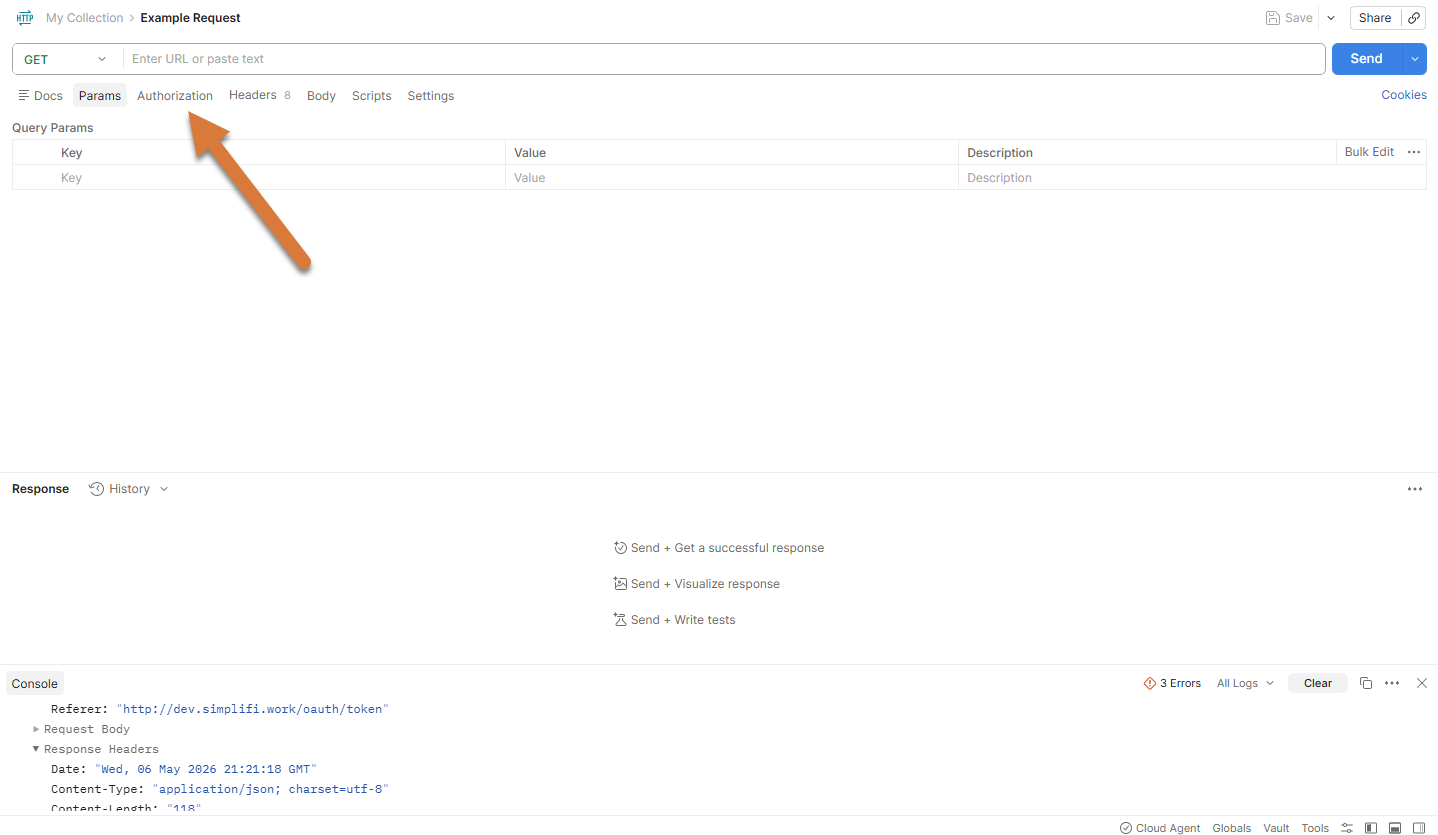 Change the Auth Type to **OAuth2.0**
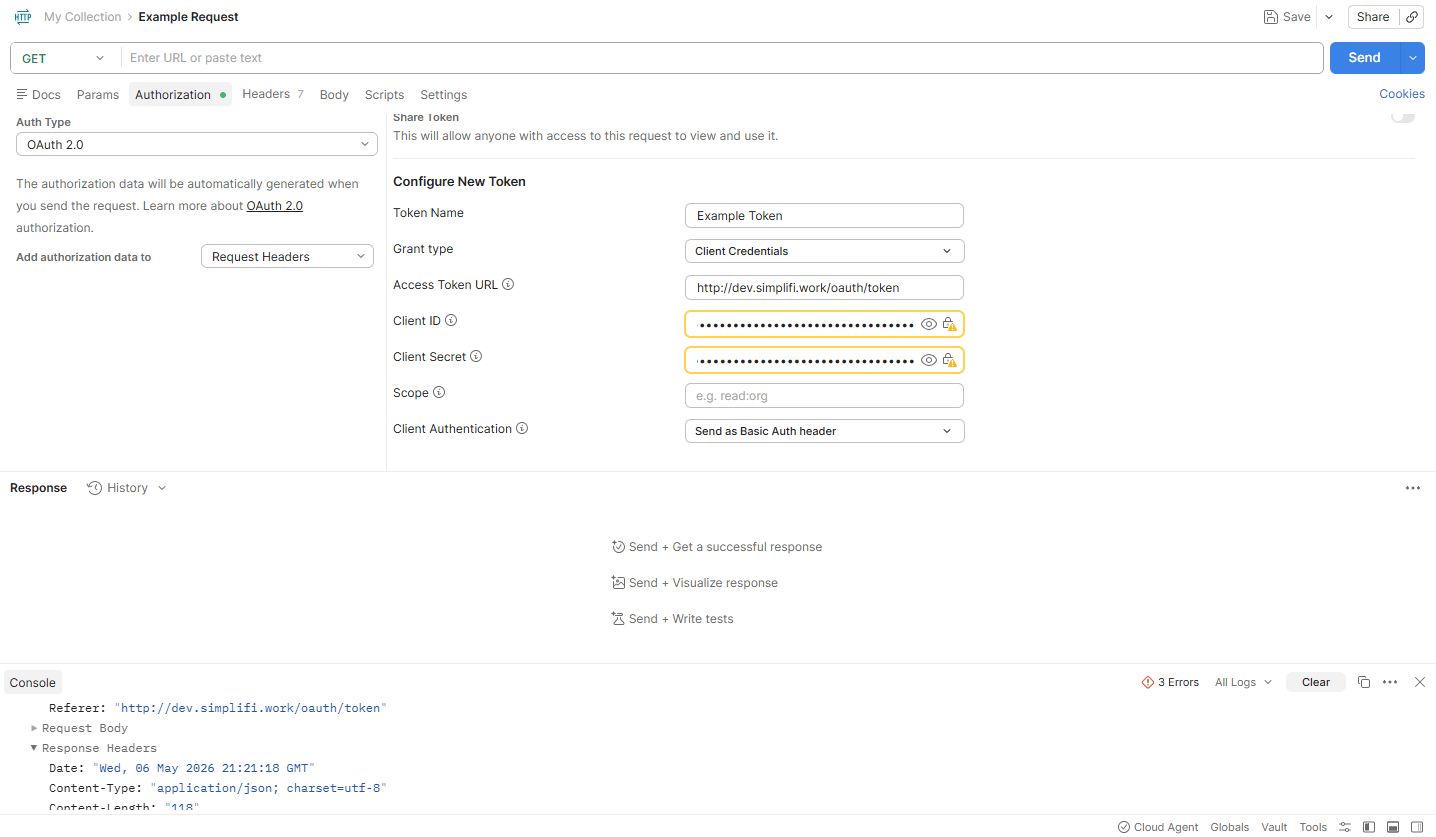
 Scroll down and enter in your **Client ID** and **Client Secret**. Make sure that *Add authorisation data to* is set to Request Headers, *Grant type* is set to Cleint Credentials, and *Client Authentication* is set to **Send as Basic Auth Header**. Scroll down and enter in your **Client ID** and **Client Secret**. Make sure that *Add authorisation data to* is set to Request Headers, *Grant type* is set to Client Credentials, and *Client Authentication* is set to **Send as Basic Auth Header**.
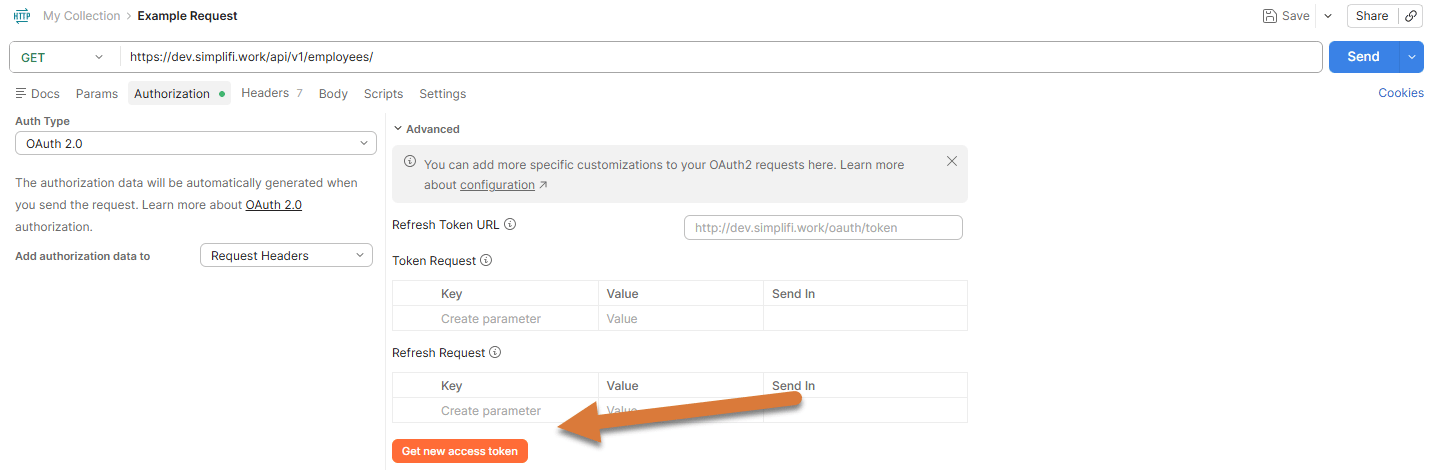
 Scroll down again and press **Get New Access Token**
 You should now have generated an access token. Press **Use Token** to proceed.
1. Now enter in the address for the request. We are going to be getting all employees in the organisation, so ours is [https://dev.simplifi.work/api/v1/employees/](https://dev.simplifi.work/api/v1/employees/)
2. Press **send** to request the employees.
You should now have generated an access token. Press **Use Token** to proceed.
1. Now enter in the address for the request. We are going to be getting all employees in the organisation, so ours is [https://dev.simplifi.work/api/v1/employees/](https://dev.simplifi.work/api/v1/employees/)
2. Press **send** to request the employees.
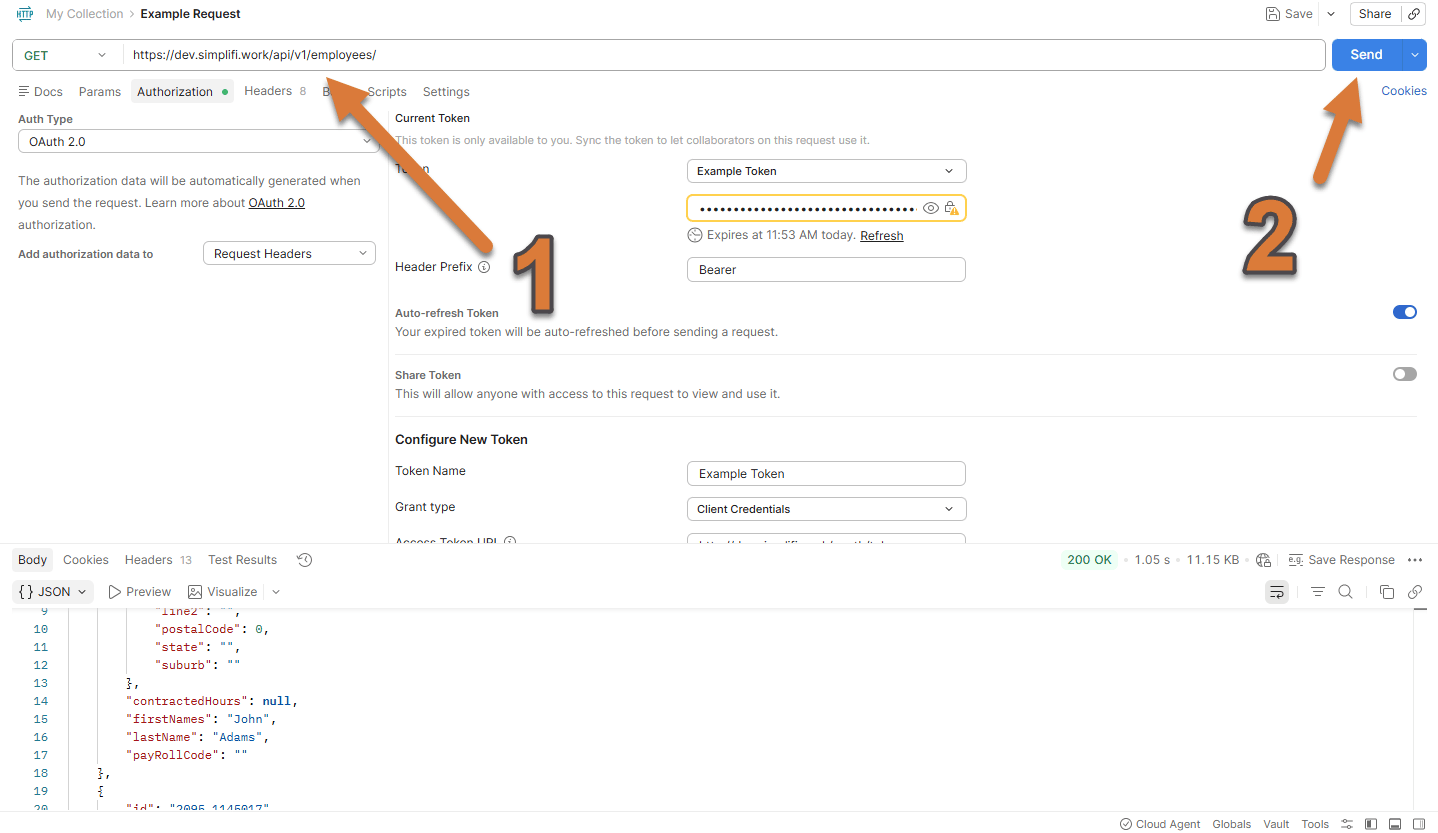 You should now be able to see in the response body at the bottom, which has all the employees.