> ## Documentation Index
> Fetch the complete documentation index at: https://docs.simplifi.work/llms.txt
> Use this file to discover all available pages before exploring further.
# Apply for Additional Jobs/Shifts
You’ll receive a notification when your organisation posts a new job or shift. It will appear on your home screen under **New Jobs**, or you can find it by clicking **Menu**, then **Jobs**, and selecting **New Jobs**.
 Click on the job to view the details and choose one of the options.
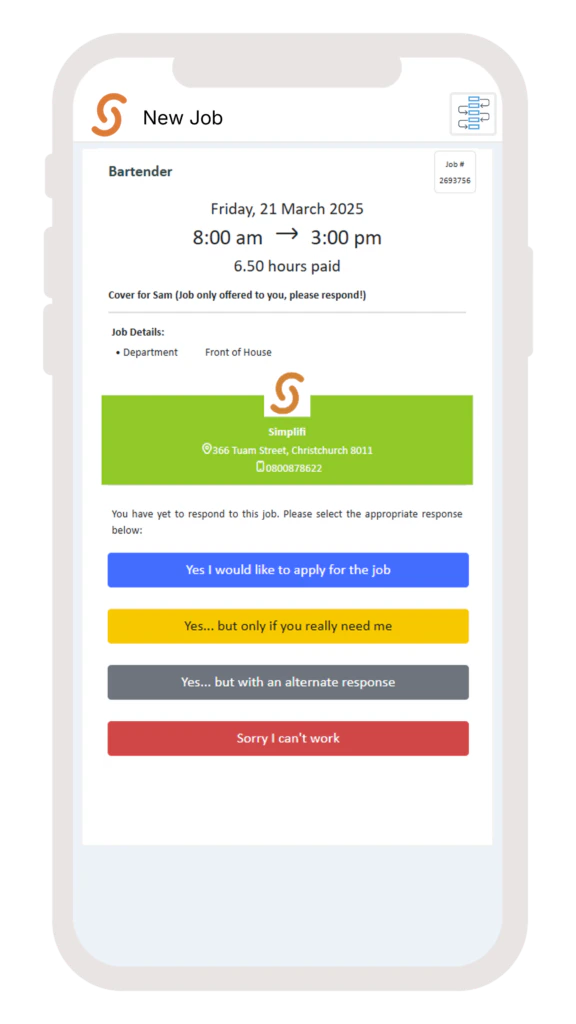 **Note: Depending on your organisation’s settings, you may only see 3 options.**
If you select **‘Yes… But with an alternative response’**, type your alternative response and select **Send**.
You’ll be notified if your request is successful.
**Note: Depending on your organisation’s settings, you may only see 3 options.**
If you select **‘Yes… But with an alternative response’**, type your alternative response and select **Send**.
You’ll be notified if your request is successful.